Hi,
While 13.0 Florence had no problems at all, TMS FNC UI Pack and other components don’t compile anymore.
The “uses” lines all fail stating “Could not compile unit” and all includes are underlined in red.
This is for FMX.TMSFNCTypes, FMX.TMSFNCUtils, FMX.TMSFNCGraphics, FMX.TMSFNCGraphicsTypes, FMX.TMSFNCCustomComponent,
FMX.TMSFNCPlanner, FMX.TMSFNCPlannerDatabaseAdapter, FMX.TMSFNCCustomControl,
FMX.TMSFNCPlannerBase, FMX.TMSFNCPlannerData
I tried to check the Library Path options and it looks like those folders for Mac OS are not installed at all.
In […]\TMS\TMS Setup\Products\tms.fnc.uipack\packages\d13 I have only
Android
Android64
iOSDevice64
iOSSimARM64
Linux64
Win32
Win64
Win64x
Nothing about MacOS.
I have used tms doctor, tms fix, and tms build -full which complains on Win64ARM (expected) but nothing about MacOS
With errors like [19:26:53 - 21%] Error building project "TMS FNC Dashboard Pack 1.3.2.3" in IDE delphi13 in Platform macos64arm: One or more errors occurred [19:26:53 - 22%] Error building project "TMS FNC Gantt Chart 1.3.3.4" in IDE delphi13 in Platform macos64arm: One or more errors occurred [19:26:53 - 24%] Error building project "TMS FNC WebSocket 1.0.6.1" in IDE delphi13 in Platform macos64arm: One or more errors occurred [19:26:53 - 27%] Error building project "TMS FNC Cloud Pack 3.7.3.1" in IDE delphi13 in Platform winarm64ec: One or more errors occurred [19:26:53 - 28%] Error building project "TMS FNC WX Pack 1.7.3.4" in IDE delphi13 in Platform macos64arm: One or more errors occurred
The self-update doesn’t do anything as everything is already up to date:
[22:46:57] === Repository Summary === [22:46:57] [22:46:58] Found tms.smartsetup.windows in repository [22:46:58] Download tasks finished [22:46:58] Total: 0, Processed: 0 [22:46:58] === Fetch Summary === [22:46:58] [22:46:58] Cleaning up downloaded files... [22:46:58] Finished cleaning up downloaded files. [22:46:58] Cleaning up downloaded files... [22:46:58] Finished cleaning up downloaded files. [22:46:58] [22:46:58] You are using the latest version of TMS Smart Setup. [22:46:58] Your current version is 3.1
And I did the build -full twice already.
No problems in RadStudio 13.0.
Just to make sure, I fully uninstalled all TMS components.
Removed all TMS folders.
And I tried to re-install just TMS FNC Core since it’s the spine of all other ones.
Still, the log immediately starts with
[23:01:39 - 36%] Error building project "TMS FNC Core 4.2.3.1" in IDE delphi13 in Platform macos64arm: One or more errors occurred
But at least this time I have OSX64, not MacOS ARM64
Also, each time I install a new version of RadStudio, I don’t upgrade on top of the previous version.
I install on a fully clean Windows VM that has nothing else and no trailing previous configs.
So I continue installing the rest to see what it does.
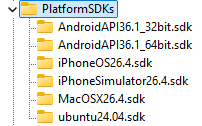
In Regedit, I also see that in CURRENT_USER/Software/Embarcadero/BDS/37.0/PlatFormSDKs the MacOSXARM SDK doesn’t appear while it’s actually selected and installed in the RadStudio SDKs options.
Looks like compiling an empty FMX Form to MacOS ARM64bit with XCode 26.4 doesn’t work (even without any TMS component). It’s probably the reason why TMS doesn’t install for ARM
An empty FMX form sent to MacOS ARM64bit returns dccosxarm64 Error] E2597 ld: file is universal (x86_64) but does not contain the arm64 architecture: C:\Mac\Home\Documents\Embarcadero\Studio\SDKs\MacOSX26.4.sdk\System\Library\Frameworks/CoreFoundation.framework/Versions\A\CoreFoundation
Building > Delphi Compiler > Compiling > Other is set to Generate macOS universal binary file
Thank you for the additional information. We do see an issue with the WinARM64ec target and are currently handling this. Other than that, the other platforms should just compile and install ok, so it looks indeed to be a configuration issue in the IDE you are using.
Actually, from other forums, it’s XCode 26.4 that breaks Delphi and is not compatible.
I’m currently installing XCode 26.3 and I think that TMS will install without trouble.
The new WinARM64 is another thing, but I don’t need it yet
I’ll keep you up to date here with my 26.3 install.
I’ve just pushed TMS FNC Core which had some issues with WinARM64. Even though you don’t need it, it should now compile. If anything comes up during the setup of the IDE, let me know. But I assume that when everything is properly configured that it should allow installing properly.