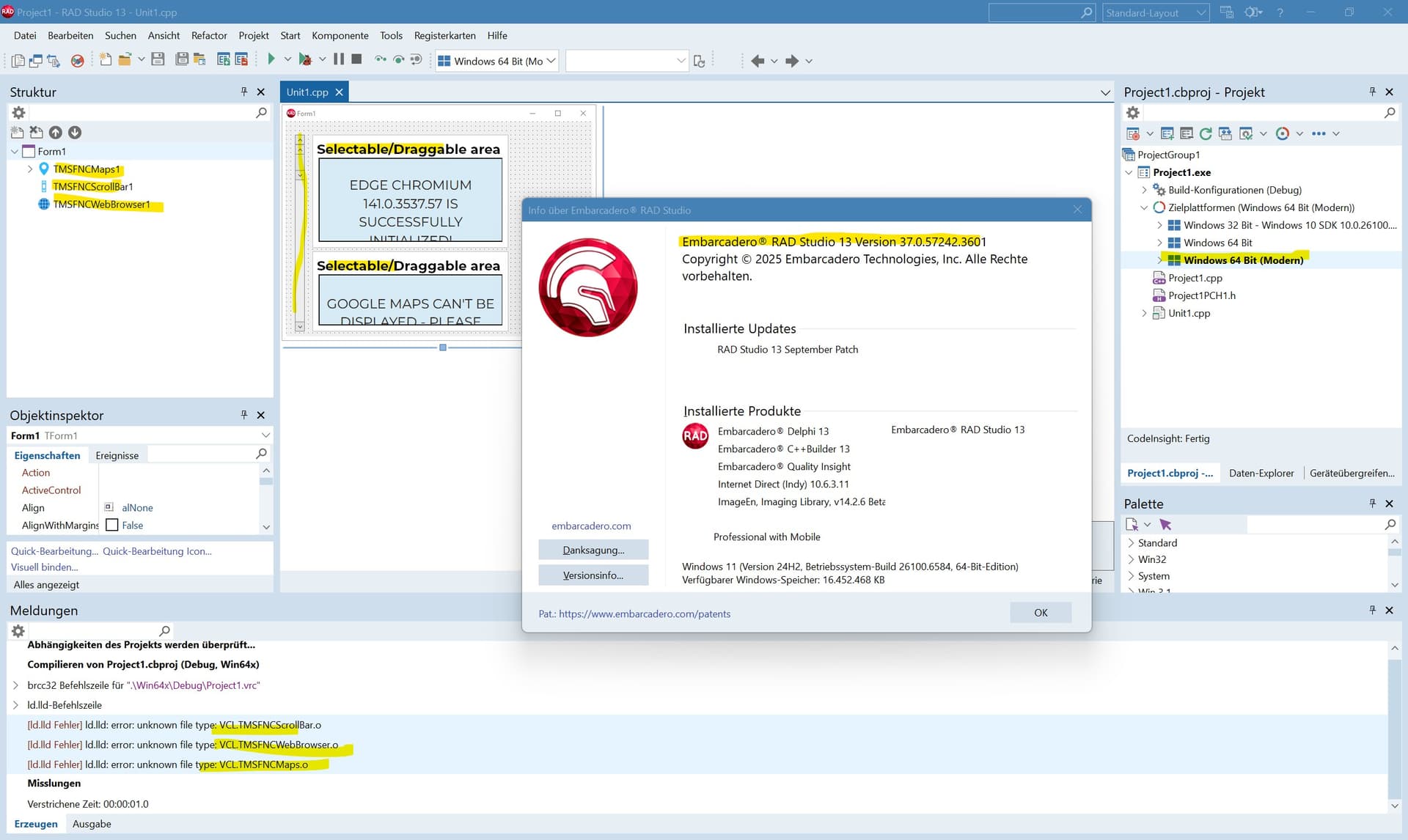
TMS FNC Maps can be used in a "Windows 64-Bit" C++ project.
When compiling the same project as "Windows 64-Bit (Modern)", I get linker error, that there are problems with .o files (see attached screenshot). But there are no such files on my whole drive.
It is a newly created project for testing. TMS FNC Maps was downloaded and installed in newest version yesterday.
No answer so far?
It's much faster to create a sample project in RAD Studio to verify this problem, then writing these lines ... ;-)
FNC Maps/Core is unusable with C++/VCL/Windows 64-Bit (Modern) which seems to be a problem of the FNC-packages (installation is automatic - I can not influence it in any way).
Other platforms ("Win32", "Win64") have no problems. In RAD13 "Win64" the executable seems to be much slower, so I want to try "Win64 modern".
Did you install TMS FNC Maps with TMS Smart Setup? Note that the installer does not compile for ARM, or modern win 64Bit. I suggest to take a look at TMS Smart Setup to solve this issue. TMS Smart Setup introduction | TMS Smart Setup documentation
Did you install TMS FNC Maps with TMS Smart Setup?
Never heard of "Smart Setup". I downloaded from "My Account / My Products" tmsfnccoresetupreg.zip/tmsfncmapssetupreg.zip, unzipped and started contained setup.exe. I don't think, that this is "Smart Setup".
Note that the installer does not compile for ARM, or modern win 64Bit.
Ok, I was not aware of that. So you don't really support "Win64 Modern"?
With RAD Studio 12.3 it worked so far.
TMS Smart Setup sounds a little bit complicate - I will try my best ...
Installing TMS Smart Setup, uninstalling "Setup-Versions" of TMS components, installing components via Smart Setup.
After compiling project, I got again "missing .o files" messages (for all target platforms). After removing several #pragma-lines in cpp files, no more .o files were criticized and executable were made.