Hello, Attempting to install VCL UI pack using the New TMS Dashboard - Failed to install onto D2007. Successful with 10.3 & 12 - logs attached.
logs.zip (28.4 KB)
It looks like something with your Delphi 2007 setup might be incorrect. TMS Smart Setup shows in its log file an issue to launch the command line:
C:\Windows\Microsoft.NET\Framework\v4.0.30319\msbuild.exe "C:\Users\splen\AppData\Local\TMS Setup\Temp\p\tms.vcl.uipack_drio_win32intel_Debug\TMSVCLUIPackPkgXls.dproj"
Can you verify if for your Delphi 2007 setup this specific command-line can be executed?
Our TMS Smart Setup tool expects a working command-line compile configuration.
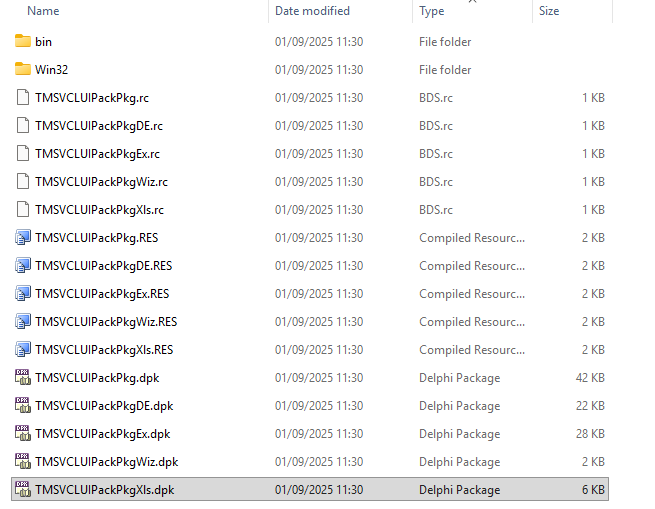
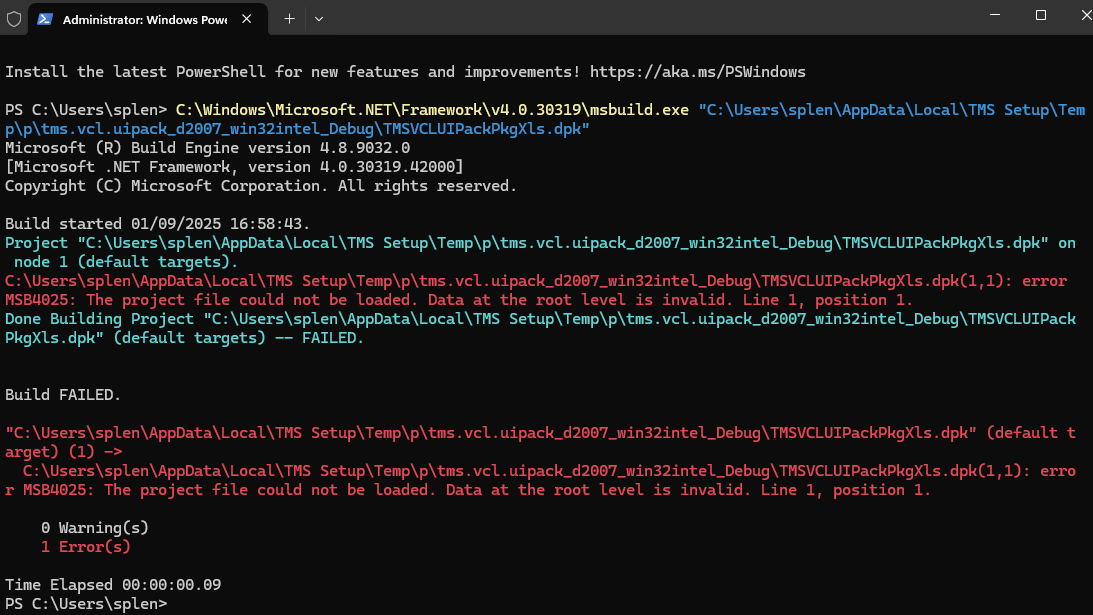
We see the .dproj file is indeed missing and we're investigating.
As urgent workaround, I suggest to use the classic installer for TM VCL UI Pack.
We'll report here when we found & fixed the cause.
Hello Bruno,
Thank you for your reply. When you say classic installer, you mean the TMS Subscription manager?
Yes, TMS Subscription Manager uses the classic installers