C++ Builder Access Violation with Static Linking

I updated TMS to the latest Versions yesterday.

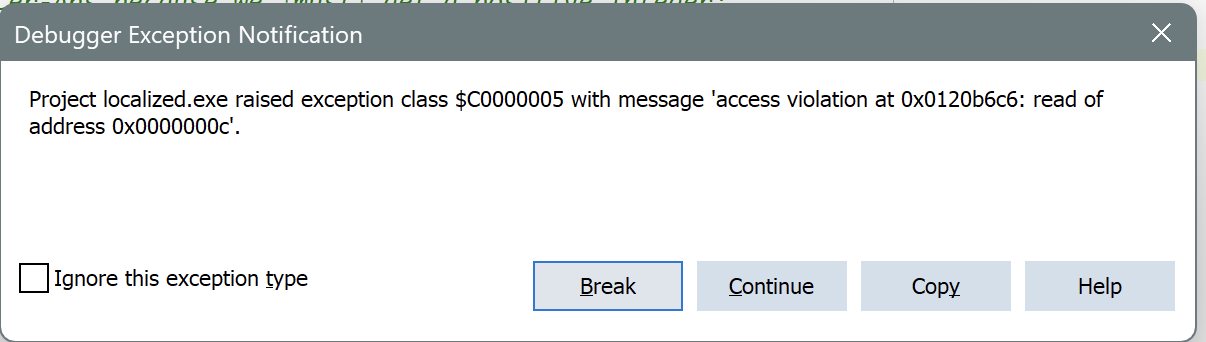
We build components based on yours. After the updating and recompiling everything, our application crashed with an Access-Violation even bevor the main-function was reached. So i wasted yesterday to search for the problem - this was really frustrating.

It seems to have something to do with the databindings. It also only occurs when statically linking and using C++ Builder.

Minimal Steps to reproduce:

  • Create a new C++ Builder Project
  • Under the Project-Options deactivate "Link with Runtime Packages"
  • Drop TTMSFNCDataGrid onto the form
  • Compile and start
  • Access Violation on startup

I attached a minimal example
AV.zip (15.8 KB)

Are you sure you rebuilt against both TMS FNC Core & TMS FNC UI Pack? There are changes in TMS FNC Core that are linked in TMS FNC UI Pack so you need to make sure to statically link against the latest version of both. You might want to do tms build -full and then see if everything is properly updated.

Here's what i did:

  • Deleted all Folders from tmssmartsetup\products as i already had "manually" installed versions and these weren't updated
  • Run tms build, so that the packages are being uninstalled
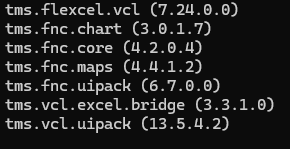
  • Run tms install tms.flexcel.vcl tms.fnc.chart tms.fnc.core tms.fnc.maps tms.fnc.uipack tms.vcl.excel.bridge tms.vcl.uipack, so that the latest packages getting installed
  • Than as described in the first post create a test application with static linking (i also disabled our own components for this test)
  • Crash

I just tried it again (for the third or fourth time now, just to be sure) :zany_face:

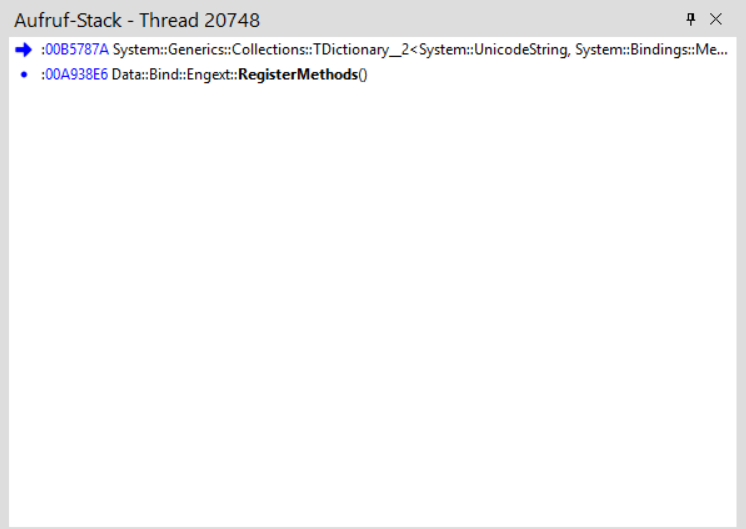
Here's the StackTrace if this helps:

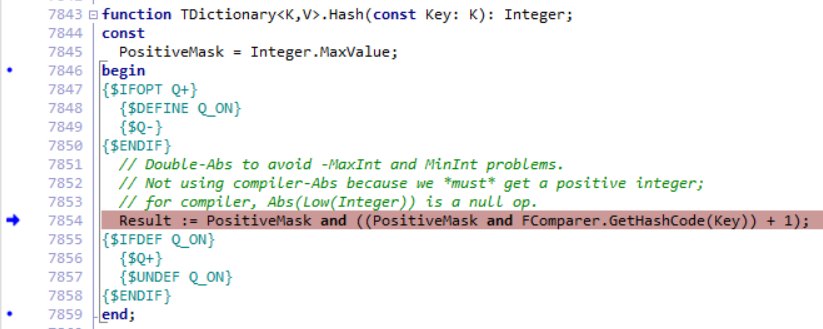
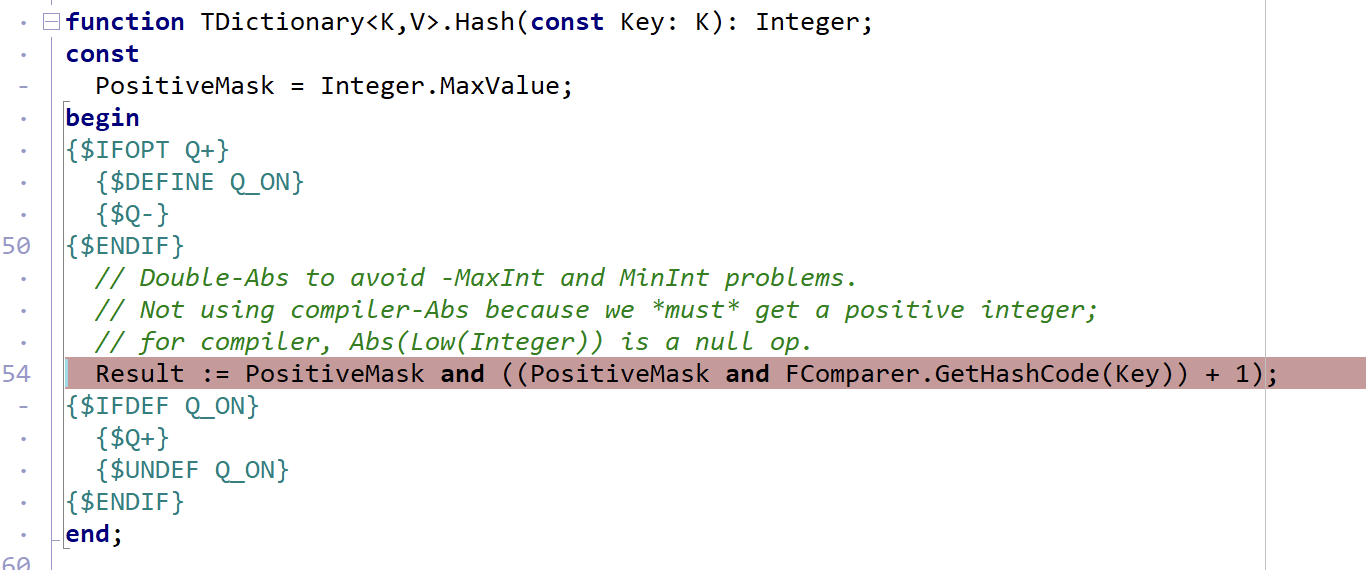
Access Violation is happening here:

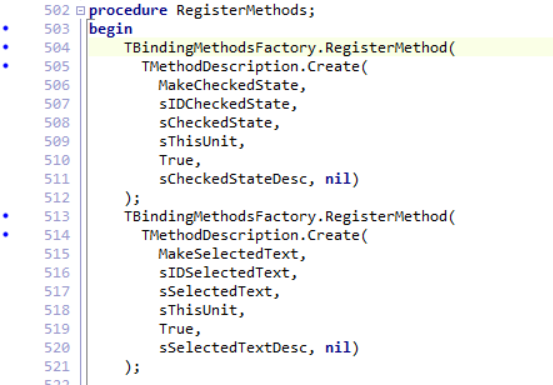
Comes from here:

Could be possible, that i am doing something wrong here when updating the components - but if, i don't know what as i always did it this way and it was never a problem.

Hi,

RegisterMethods is something inside Data.Bind.EngExt, which is an RTL unit, not an FNC unit. it is included in BindCompReg, a unit related to property editors. I assume this is called at designtime to register specific LiveBindings methods. Which packages did you link exactly?

We also meanwhile tested your project in C++Builder 12 and couldn't reproduce the issue.

Weird. And even more frustrating.

I tracked it further down:
As soon as #pragma link "VCL.TMSFNCCustomControl" is present the error occurs for me (also for my collegues).

Here's the Cpp-File:

//---------------------------------------------------------------------------

#include <vcl.h>
#pragma hdrstop

#include "Unit12.h"
//---------------------------------------------------------------------------
#pragma package(smart_init)
#pragma link "VCL.TMSFNCCustomControl"
//#pragma link "VCL.TMSFNCDataGrid"
//#pragma link "VCL.TMSFNCDataGridBase"
//#pragma link "VCL.TMSFNCDataGridCell"
//#pragma link "VCL.TMSFNCDataGridCore"
//#pragma link "VCL.TMSFNCDataGridData"
//#pragma link "VCL.TMSFNCDataGridRenderer"
//#pragma link "VCL.TMSFNCGraphics"
//#pragma link "VCL.TMSFNCGraphicsTypes"
//#pragma link "VCL.TMSFNCTypes"
//#pragma link "VCL.TMSFNCUtils"
#pragma resource "*.dfm"
TForm12 *Form12;
//---------------------------------------------------------------------------
__fastcall TForm12::TForm12(TComponent* Owner)
	: TForm(Owner)
{
}
//---------------------------------------------------------------------------

The Header:

//---------------------------------------------------------------------------

#ifndef Unit12H
#define Unit12H
//---------------------------------------------------------------------------
#include <System.Classes.hpp>
#include <Vcl.Controls.hpp>
#include <Vcl.StdCtrls.hpp>
#include <Vcl.Forms.hpp>
//#include "VCL.TMSFNCCustomControl.hpp"
//#include "VCL.TMSFNCDataGrid.hpp"
//#include "VCL.TMSFNCDataGridBase.hpp"
//#include "VCL.TMSFNCDataGridCell.hpp"
//#include "VCL.TMSFNCDataGridCore.hpp"
//#include "VCL.TMSFNCDataGridData.hpp"
//#include "VCL.TMSFNCDataGridRenderer.hpp"
//#include "VCL.TMSFNCGraphics.hpp"
//#include "VCL.TMSFNCGraphicsTypes.hpp"
//#include "VCL.TMSFNCTypes.hpp"
#include "VCL.TMSFNCUtils.hpp"
#include <System.Rtti.hpp>
//---------------------------------------------------------------------------
class TForm12 : public TForm
{
__published:	// Von der IDE verwaltete Komponenten
private:	// Benutzer-Deklarationen
public:		// Benutzer-Deklarationen
	__fastcall TForm12(TComponent* Owner);
};
//---------------------------------------------------------------------------
extern PACKAGE TForm12 *Form12;
//---------------------------------------------------------------------------
#endif

Commenting the line with#pragma link "VCL.TMSFNCCustomControl" and the program starts again.

Following Packages are set (default when creating a new project):

adortl;appanalytics;bcbie;bcbsmp;bindcomp;bindcompdbx;bindcompfmx;bindcompvcl;bindcompvclsmp;bindcompvclwinx;bindengine;CloudService;CodeSiteExpressPkg;CustomIPTransport;DataSnapClient;DataSnapCommon;DataSnapConnectors;DatasnapConnectorsFreePascal;DataSnapFireDAC;DataSnapIndy10ServerTransport;DataSnapNativeClient;DataSnapProviderClient;DataSnapServer;DataSnapServerMidas;dbexpress;dbrtl;dbxcds;DbxClientDriver;DbxCommonDriver;DBXDb2Driver;DBXFirebirdDriver;DBXInformixDriver;DBXInterBaseDriver;DBXMSSQLDriver;DBXMySQLDriver;DBXOdbcDriver;DBXOracleDriver;DBXSqliteDriver;DBXSybaseASADriver;DBXSybaseASEDriver;dsnap;dsnapcon;dsnapxml;emsclient;emsclientfiredac;emsedge;emshosting;emsserverresource;FireDAC;FireDACADSDriver;FireDACASADriver;FireDACCommon;FireDACCommonDriver;FireDACCommonODBC;FireDACDb2Driver;FireDACDBXDriver;FireDACDSDriver;FireDACIBDriver;FireDACInfxDriver;FireDACMongoDBDriver;FireDACMSAccDriver;FireDACMSSQLDriver;FireDACMySQLDriver;FireDACODBCDriver;FireDACOracleDriver;FireDACPgDriver;FireDACSqliteDriver;FireDACTDataDriver;FlexCel_Core;FlexCel_Pdf;FlexCel_Render;FlexCel_XlsAdapter;fmx;FMX_FlexCel_Components;FMX_FlexCel_Core;fmxase;fmxdae;fmxFireDAC;fmxobj;FMXTMSFNCChartPkg;FMXTMSFNCCorePkg;FMXTMSFNCMapsPkg;FMXTMSFNCUIPackPkg;IndyCore;IndyIPClient;IndyIPCommon;IndyIPServer;IndyProtocols;IndySystem;inet;inetdb;inetdbxpress;inetstn;RESTBackendComponents;RESTComponents;rtl;Skia;soapmidas;soaprtl;soapserver;tethering;TMSFNCCorePkg;TMSVCLUIPackPkg;TMSVCLUIPackPkgEx;TMSVCLUIPackPkgWiz;TMSVCLUIPackPkgXls;vcl;VCL_FlexCel_Components;VCL_FlexCel_Core;VCL_TMSVCLGridExcelBridge;vclactnband;vcldb;vcldsnap;vcledge;vclFireDAC;vclie;vclimg;VCLRESTComponents;VclSmp;VCLTMSFNCChartPkg;VCLTMSFNCCorePkg;VCLTMSFNCMapsPkg;VCLTMSFNCUIPackPkg;vcltouch;vclwinx;vclx;xmlrtl

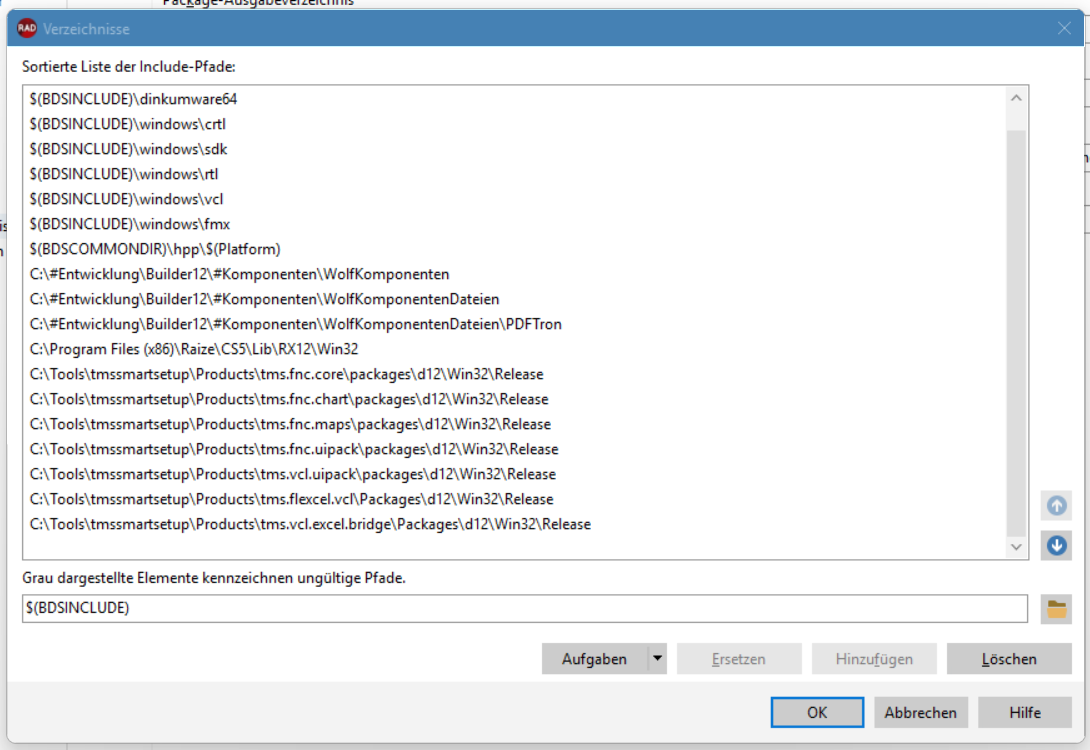
Paths are configered as follows (maybe there's something wrong here?)

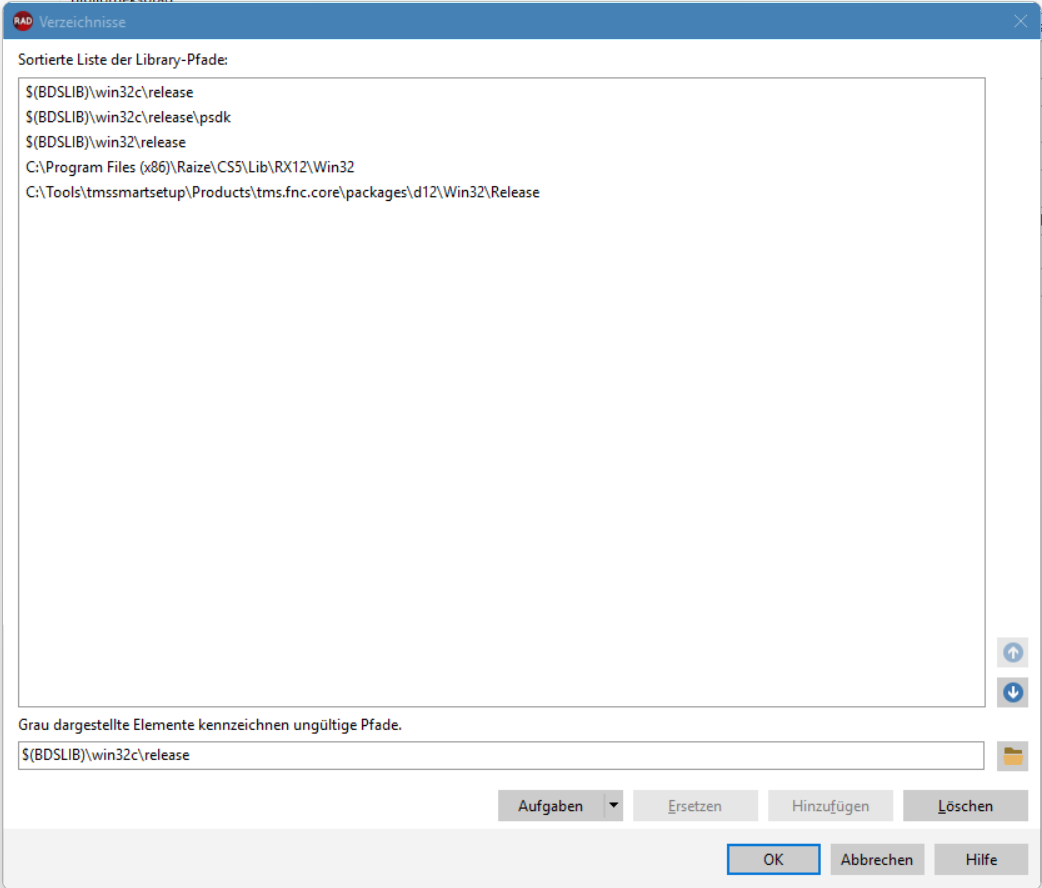
Can you temporarily paths starting from C:#Entwicklung, and only keep the path for tms.fnc.core? Then see what happens when linking against VCL.TMSFNCCustomControl

I removed everything:

But then i'm unable to link:
image

Re-Adding only tms.fnc.uipack results in the same error as before ...

If you don't link with runtime packages, then I assume you don't need to add them to the list of packages to link with, or am I mistaken? If you have a brand new project, I assume it doesn't link with any FNC packages, so what happens if you add the header file then? Aside from that, can you check this setting on project level?

image

If it's true or false? and if changing it makes a difference

To be honest i don't know how C++ Builder is managing this. I always thought, that it uses the list of runtime packages to link either with lib or bpl, depending on the "Link with runtim packages" options, but not sure about that. We also almost never touch the list of packages but let them as is.

Classic Compiler is deactivated in all of our projects - we use the "new" clang based. Also activating the old compiler leads to an error while compiling.

Creating a new Project without dropping a Component on the form and adding these two Headers to the .h-file gives the error:

#include "VCL.TMSFNCUtils.hpp"
#include "VCL.TMSFNCCustomControl.hpp"

Commenting out the latter - error gone.

Commenting out the first leads to an linker error:

I’m out of ideas for the moment. Tested your project here in C++Builder 12, no issues. So I really don’t know where to look next. Maybe switch between debug and release?

Same here. I now also tested old installers. Switching between debug and release doesn't solve the problem.
Just checked on a PC, where the old Version is installed. There wasn't a TMSFNCCustomControl. So i assume it has really something to do with it.

So we stick with the old version and test when a new one comes out - maybe then it works.
Or maybe with the new Builder/Delphi Version which shouldn't be that far.

Nevertheless thank you for your help.

1 Like

One thing i just tried:
Using the Modern 64bit Compiler works. Wheres normal 64 and 32bit (CLANG Based) not.
But that doesn't help us :sweat_smile:

I'll ask around the guys from TMS Smart Setup. I'm not entirely sure how it is compiled, supposedly with the default settings, either way I'll test again by removing and reinstalling the current version and report back when I have news.

I found the Problem! This error got really on my nerves. But i am happy to know what the problem is :see_no_evil_monkey:

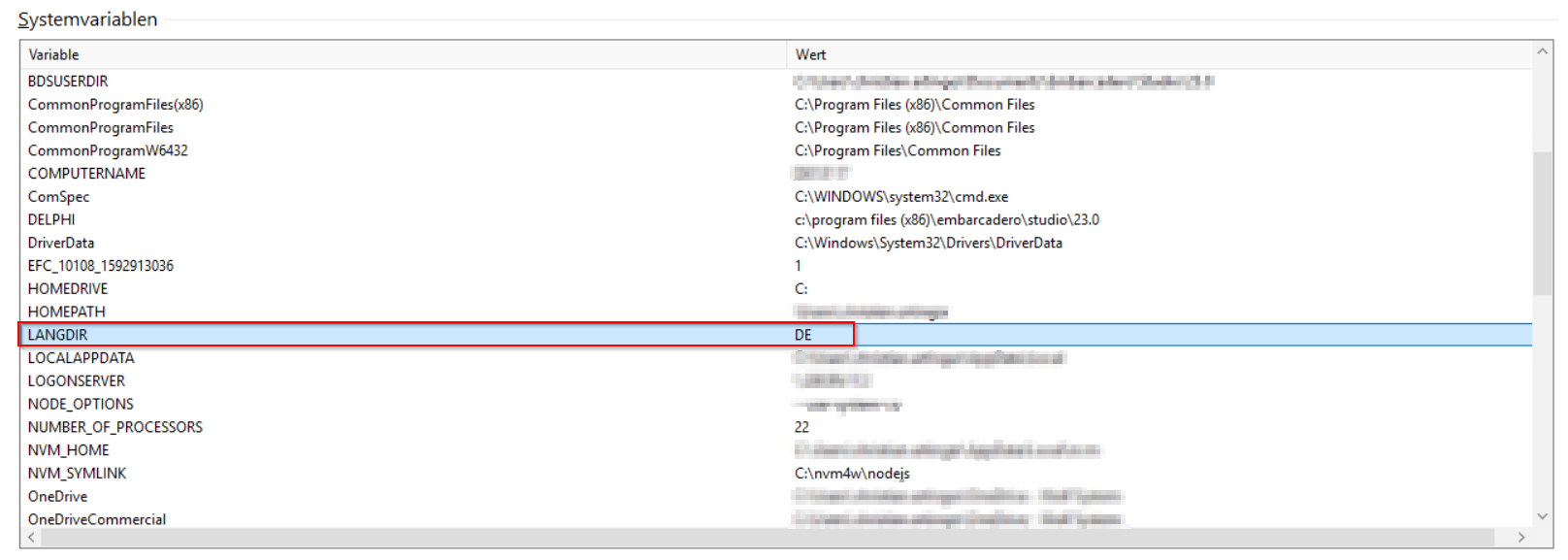
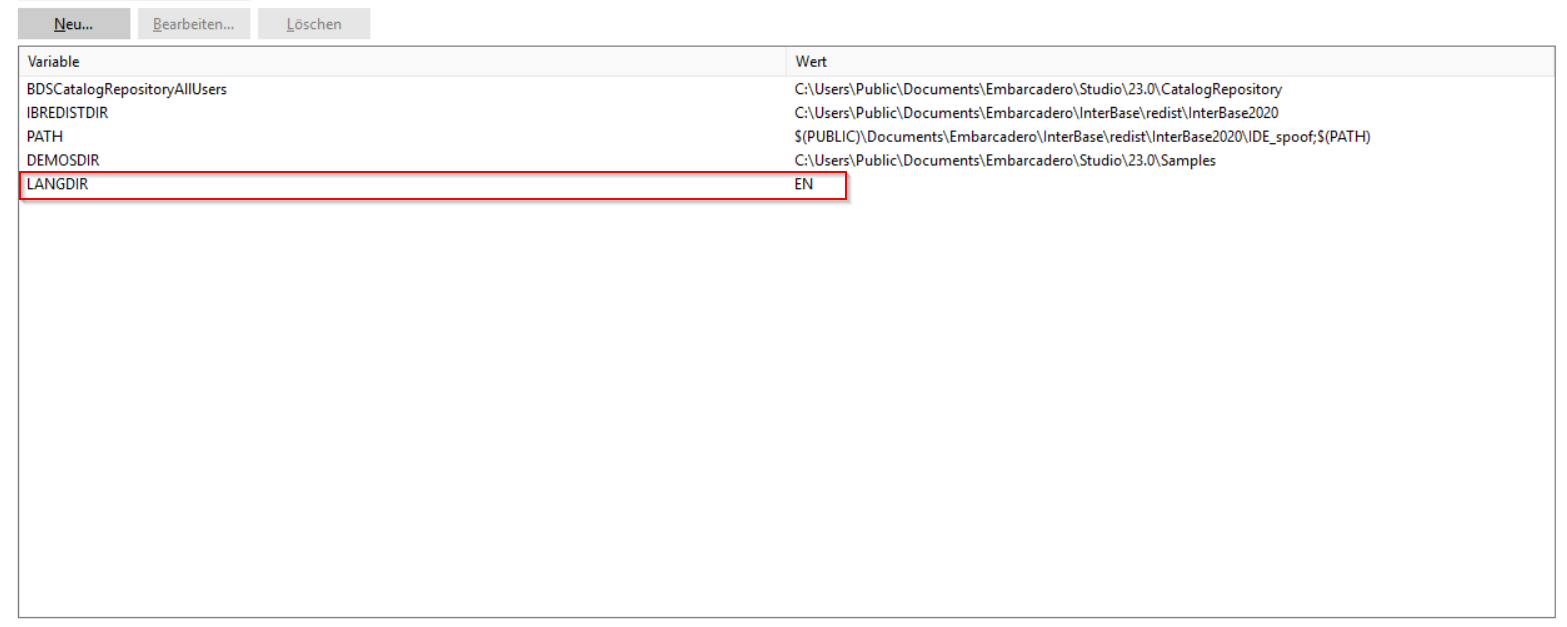
We have the IDE set to german. In the environment variables, the variable "LANGUAGE" is set to "DE".

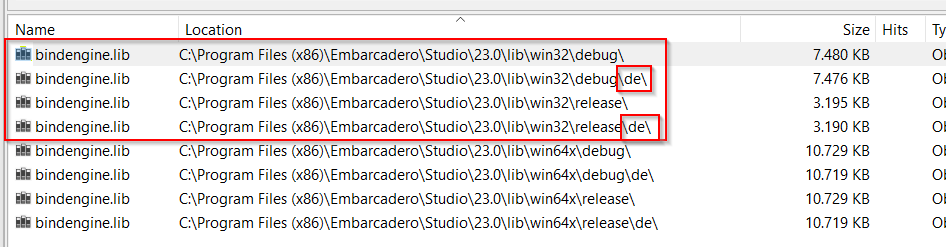
There are two versions of "bindengine.lib" one in the normal lib-folder and one in the "de"-subfolder.

Overriding the default LANGDIR with "EN" does solve the problem:

So here's my assumption:
tmssmartsetup (and tradditional installers as it seems) are linking/referencing against the "normal" (englisch) version of the libs, whereas the ide is using the localized version if LANGDIR is set correspondingly.
That causes a missmatch between linked libraries in components/programs and causing the program to crash.

Maybe in the older versions there weren't packages linked, that are in both folders (or the difference was so small, that it didn't matter).

Temporarly we set the LANGDIR to "ENG", but maybe this is something that can be fixed in the installers.

1 Like

ooooff, that was hard to find, but indeed very valuable information. I'll pass it along. Thanks for the followup

1 Like

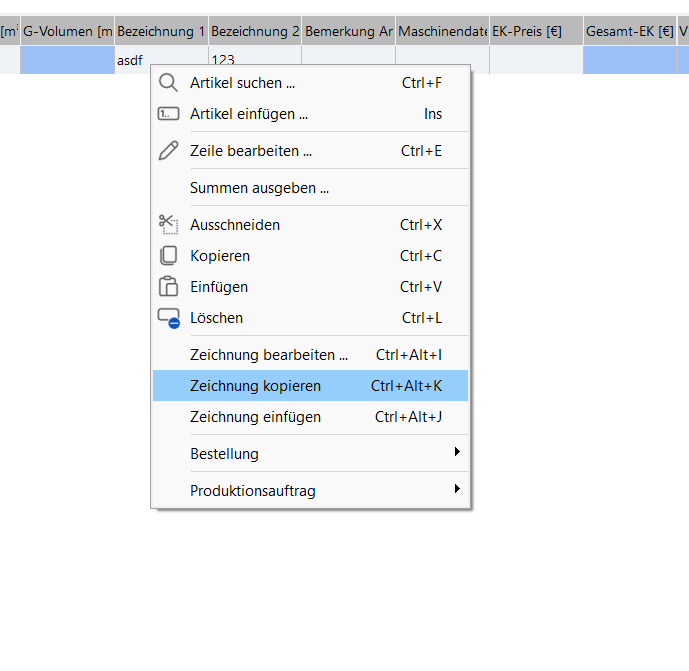
I found a little drawback that is not ideal in this solution: Text that is "generated" by the IDE (for example Shortcuts) are now in English instead of German:

Wow, what a weird bug :slightly_frowning_face: Thanks for all the effort you put in reproducing it!

I've managed to reproduce it here with a much simpler setup, but I still have many doubts about what is happening and what the right thing to do is here. Can I ask a couple of follow-up questions?

  1. If you open the cmd.exe, and execute C:\Program Files (x86)\Embarcadero\Studio\23.0\bin\rsvars.bat, then do echo %LANGDIR% what language do you see? I ask because I tried in a VM here (VM was in English) and then manually converted to DE with BDSSetLang.exe, but my rsvars.bat left LANGDIR in "EN", even if when I go to the IDE->Options->Environment Variables I see "DE"
  2. if you now go to the folder where your test app is, and type msbuild /target:build does the new compiled app crashes or not?
    2.1 if it didn't crash and langdir wasn't in DE, can you type set LANGDIR=DE and then repeat msbuild /target:build?
  1. With the Standard Installation (DE), echo %LANGDIR% produces "DE". When changing the Language via BDSSetLang.exe (IDE UI language as wall as Library Langauge) it stays the same ("DE"). But the value for "LANGDIR" in the IDE is empty this time:
    image

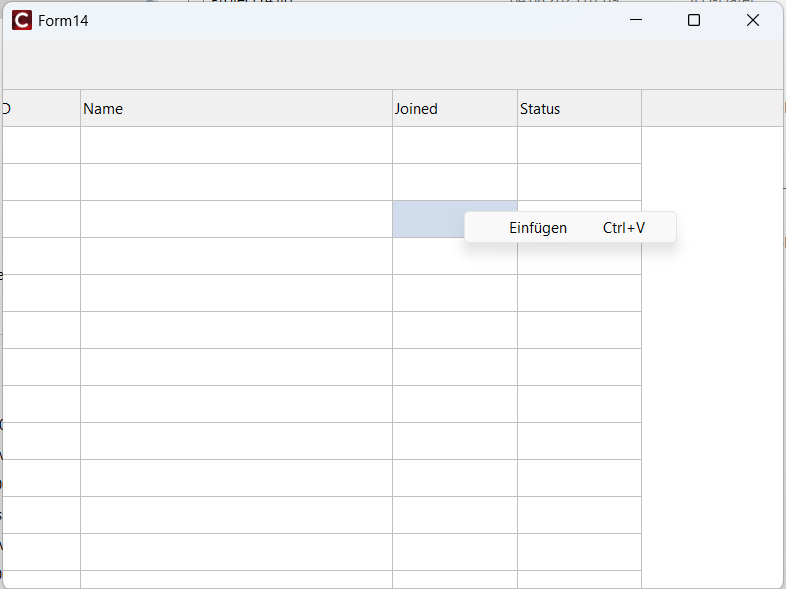
  2. I tested msbuild /target:build with the standard IDE-Settings (LANGDIR=DE). This worked, while trying to compile it with the IDE crashes. It seems, that msbuild /target:build is linking with the english Version of the libs (as you can see in the Screenshot, the Shortcut is in english, but it should be in German when linked against the german lib)

  3. Executing set LANGDIR=DE doesn't have an effect - result is same as in 2.

Thanks for the extra info, it kind of confirms what I was thinking:

  1. This is broken at embarcadero's side. We could workaround it with smartsetup by reading the LANGDIR env variable an passing the correct paths, but LANGDIR seems to be a mess, and it isn't guaranteed that what the IDE sees is what the command line sees. So we might still compile against the wrong lib because we are compiling from the command line, not the IDE.
  2. A small nitpick, because while we normally don't think much about the terms, it is important here: tms pack isn't linked against the english libs. In fact it isn't linked at all. The only link happens when you link the app, and there, if "en" and "de" libs are ABI compatible, you should be able to pick one or the other without recompiling tms pack against them. What gets linked is what is active when you build your app. The problem here is that tms pack is compiled against a different lib, which looks to have a different ABI, and so it crashes when it tries to call anything in the swapped lib. But from what I see all those localized units seem to be just resourcestrings, so, unless some unit I haven't found yet is wrong, you should be able to compile against one and link against a different one.

What I also found out is that there seems to be a unit initialization issue (which I am not really sure how it relates to localized libs).

The error is happening here (unit System.Bindings.Methods.pas):

class procedure TBindingMethodsFactory.RegisterMethod(
  AMethod: TMethodDescription);
begin
  if FRegisteredMethods.ContainsKey(AMethod.ID) then
    raise EBindMethodError.CreateResFmt(@sDuplicatedMethodName, [AMethod.ID]);
  FMethodScope := nil;
  FRegisteredMethods.Add(AMethod.ID, AMethod);
end;

Because FRegisteredMethods wasn't initialized yet. But then, it should have been because that class has a class constructor:

class constructor TBindingMethodsFactory.Create;
begin
  FRegisteredMethods := TBindingMethods.TMethodList.Create;
end;

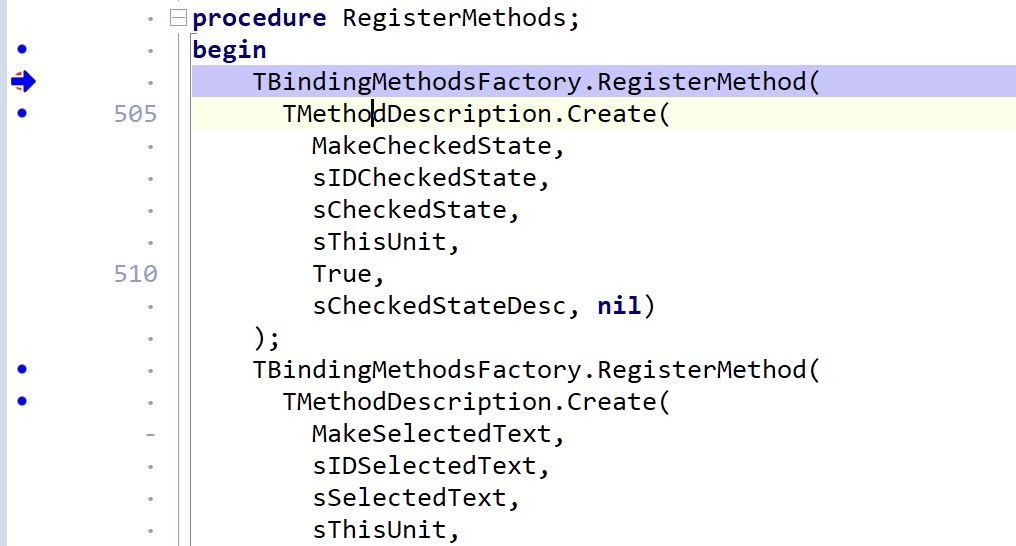
Now, if you debug, put a breakpoint in Data.Bind.EngExt.pas -> procedure RegisterMethods, and move the blue arrow to the end (so it skips the method):

you will see that after it ends, then it calls the class constructor:

So it is also a problem of initialization order too.

Further going into the "order of initialization" issue, if I go and manually change the order of linked libraries in the .cbproj, then it compiles fine.

I had:

<AllPackageLibs>rtl.lib;vcl.lib;bindcomp.lib;bindengine.lib;dbrtl.lib;vclwinx.lib;vclimg.lib;xmlrtl.lib;vclie.lib;vcledge.lib;VclSmp.lib;vclx.lib</AllPackageLibs>

And this crashed:


In the same place as yours:

But, if I swap the order of bindcomp.lib and bindengine.lib:

<AllPackageLibs>rtl.lib;vcl.lib;bindengine.lib;bindcomp.lib;dbrtl.lib;vclwinx.lib;vclimg.lib;xmlrtl.lib;vclie.lib;vcledge.lib;VclSmp.lib;vclx.lib</AllPackageLibs>

Then it works (!!)
I wonder if you see the same in your project. (note that when you change allPackageLibs, it is better to restart the IDE and do a full build, because there is a lot of caching going on)
I've been testing in a simpler setup than yours, not against tms pack, but against a simpler package instead of fnc pack. I could reproduce it with this package:

And this app:

To make it a little more interesting, I changed the "UBindings.pas" to be:

unit UBindings;

interface
uses Data.Bind.EngExt, System.Bindings.Consts;

procedure WriteMessage;
implementation

procedure WriteMessage;
begin
    Writeln('From library: ' + sFormatArgError);
end;
end.

And the app calling the library to be:

#include <vcl.h>
#include <tchar.h>

#pragma link "LocalizedBindings.lib"
#include "UBindings.hpp"
#include <System.Bindings.Consts.hpp>
#include <iostream>

int _tmain(int argc, _TCHAR* argv[])
{
     auto p = System_Bindings_Consts_sFormatArgError;
    WriteMessage();
   std::wcout << "From app: " << p << std::endl;
}

As you can see, it calls "WriteMesage" in the library (which was compiled with "EN" locale) and then prints the same parameter, but from the app. If I switch the AllLibs order as mentioned above, I get:

Which also confirms that there is a single linked localized lib. Even when the lib was compiled against the english locale, WriteMessage writes the message localized, because the app was linked with the localized libs.

I don't know what else to say here. This is a weird error, but the actual issue is the order that libraries are linked in your app (for some reason, it is triggered by linking libs compiled against different localizations, but that doesn't seem to be the issue). We can't fix that, probably embarcadero should rewrite the bindings code so the initialization of a unit doesn't depend in the initialization of the other.

Also when this happens, it is really hard to find out the actual bug. We were lucky you went through all the effort to find out how to reproduce it, but we might not be so lucky next time. I'll open a bug report with embarcadero.
1 Like