How to access displayed content in TMSFNCWebBrowser?

In another project, I used Delphi's built-in browser. But it performed poorly and displayed the site poorly in Windows. Now I want to rewrite the code for TMSFNCWebBrowser. But I've run into a problem. In the previous project, by clicking a button, I could access the content and find (for example) a specific word in the browser and the number of times it was mentioned. Here's the old code:

 WebBrowser1.EvaluateJavaScript( 'document.documentElement.innerText',
    procedure(const Res: string)
    var
      Matches: TMatchCollection;
    begin
      Matches := TRegEx.Matches(Res, TRegEx.Escape(word), [roIgnoreCase]);
      LabelResult.Text := Format('%d occurrences found.', [Matches.Count]);
    end);

Everything worked. But when I tried your browser, I couldn't find EvaluateJavaScript. What can I replace it with? How can I find the word I need in a downloaded browser page?

Also, is it possible to save what the browser displays to an HTML file?

Hi,

for TTMSFNCWebBrowser it's actually ExecuteJavaScript

  TMSFNCWebBrowser1.ExecuteJavaScript('document.documentElement.innerText',
    procedure(const Res: string)
    var
      Matches: TMatchCollection;
    begin
      Matches := TRegEx.Matches(Res, TRegEx.Escape(word), [roIgnoreCase]);
      LabelResult.Text := Format('%d occurrences found.', [Matches.Count]);
    end);

If you want to save it to HTML you can use document.documentElement.outerHTML and then save the contents to a HTML file

Thank you, everything worked out! Is it possible to write not in HTML, but in PDF?

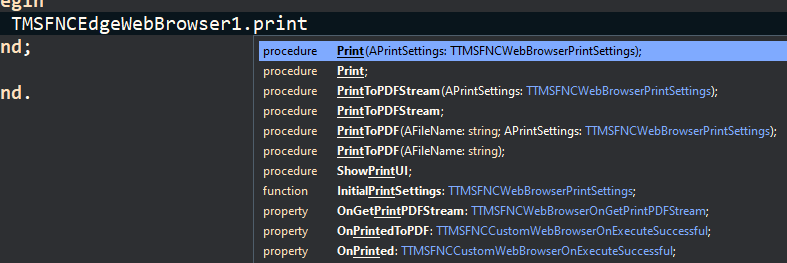
If you use TTMSFNCEdgeBrowser, there is a function to save to a PDF.

I'm using TMSFNCWebBrowser, but I didn't find this function in TTMSFNCEdgeBrowser either.

There are some Print methods

We are talking about TMSFNCWebBrowser, not TTMSFNCEdgeBrowser.

Yes, this is only available in TTMSFNCEdgeBrowser since it's a Windows specific feature. TTMSFNCWebBrowser is cross platform but doesn't support this printing feature on all platforms.