ev_Nagy
(ev Nagy)
April 19, 2026, 5:53pm
1
procedure TForm1.Button2Click(Sender: TObject);
begin
with WebCopy2.Items.Add do begin
FTPHost := '192.168.0.110';
FTPport:=22;
FTPUserID := 'sftpuser';
FTPPassword := 'sftp';
Protocol := wpSFTP; // Ez aktiválja az SFTP-t
TargetDir := 'c:\projekt\NEXON';
Targetfilename:='/upload/2024.xls';
URL := 'https://192.168.0.110/upload/2024.xls ';
end;
WebCopy2.ThreadExecute;
end;
Dear Support,
I cannot use webcopy (no error ,no result)
Please help!
Did you put the needed SSL DLL files in the same folder where your EXE was created?
If the problem persists, can you enable logging on TWebCopy and send the generated log file so we can inspect what goes wrong at what step?
ev_Nagy
(ev Nagy)
April 20, 2026, 7:52am
3
Hello Bruno,
Do You mean files :
Could You send me a code snippet how to catch/log on TWEBCopy. ?
ev_Nagy
(ev Nagy)
April 20, 2026, 8:08am
4
10:06 20.04.2026 : [SFTP] Info: Start download
10:06 20.04.2026 : [SFTP] Info: Create socket
10:06 20.04.2026 : [SFTP] Info: Connecting socket to host: sftp2.nexon.hu
10:06 20.04.2026 : [SFTP] Info: Initializing libssh
Looks like a SSH initialization issue.
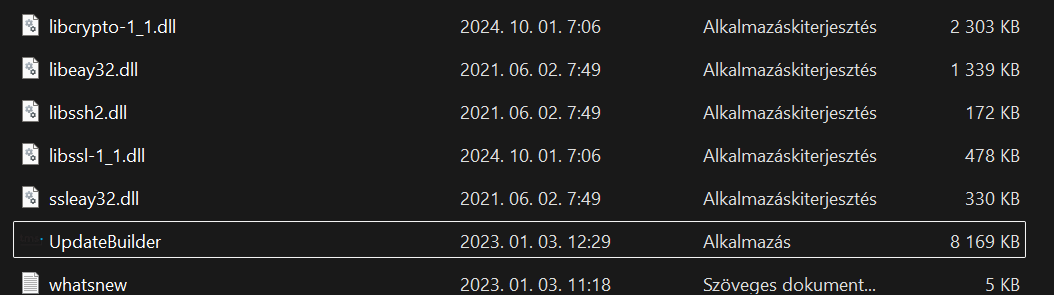
Make sure libseay32.dll / libssh2.dll / ssleay32.dll are in your EXE folder