I have this PopupMenu:
object AdvPopupMenuLibPaths: TAdvPopupMenu
Images = ImageListMenu
OnPopup = AdvPopupMenuLibPathsPopup
Version = '2.7.1.16'
UIStyle = tsOffice2019White
Left = 390
Top = 290
object miCopyPath: TMenuItem
Caption = 'Copy Path'
ImageIndex = 0
end
object miExplorePath: TMenuItem
Caption = 'Explore Path...'
ImageIndex = 1
end
end
I assign the shortcuts:
procedure TForm1.AssignShortcuts;
const
VK_C = $43; // Hex for 67
begin
miCopyPath.ShortCut := VK_C + scCtrl;
miExplorePath.ShortCut := VK_C + scCtrl + scShift;
end;
This the result:
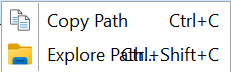
This does not happen with a simple TPopupMenu.
How can this misalignment be avoided?
When using this bloody workaround, then I get this:
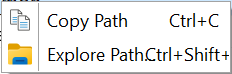
Only after adding a TAdvMenuStyler I got the desired result:
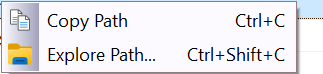
I think such a basic functionality should be included in TAdvPopupMenu without the user needing to add a TAdvMenuStyler!
It is frustrating and counter-intuitive that a component labeled "Advanced" requires a separate helper component just to perform basic text measurement correctly at runtime.
I cannot reproduce this with the information provided.
See sample project WITHOUT TAdvMenuStyler.
Project1.zip (5.8 KB)
Your project has the same effect as on mine:
My system:
Delphi 13
Windows 11
Do you need any extra information?
Should I send you the signed exe of your project?
The problem had more details to it.
It only happens with DPI > 100% and only on Delphi 12 or newer.
We applied a fix now for this issue and next TMS VCL UI Pack will have this fix.
Dear Bruno, thank you for your excellent support! I am looking forward to the fix.
It is in TMS VCL UI Pack v13.5.12.0 that has been released now.
Thank you for the information!
Is the fix for the TAdvPageControl bug included as well?
No, your support question regarding TAdvPageControl was raised only today and it is on the todolist for investigation.


