I’ve recently upgraded my TMS products.
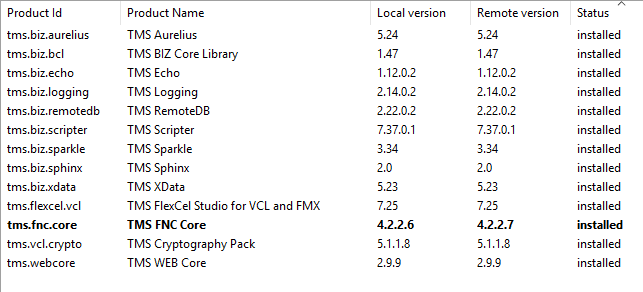
New versions:
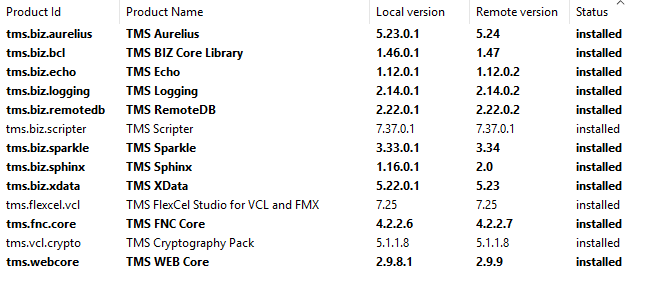
Old versions:
However, when I build my existing webapps, which have their own custom loginapp folders, I get a blank page and a number of errors in the console:
:2024/{app-name}/oauth/login/?tid=50520e5d5fce4a87d0aa60b864e74c5c74394af81b5cb8828d247f65e7020628#/account:1 Refused to apply style from 'http://127.0.0.1:2024/{app-name}/oauth/login/css/bootstrap.min.css' because its MIME type ('') is not a supported stylesheet MIME type, and strict MIME checking is enabled.
:2024/{app-name}/oauth/login/?tid=50520e5d5fce4a87d0aa60b864e74c5c74394af81b5cb8828d247f65e7020628#/account:1 Failed to find a valid digest in the 'integrity' attribute for resource 'http://127.0.0.1:2024/{app-name}/oauth/login/extras/jquery-3.3.1.slim.min.js' with computed SHA-384 integrity 'yQAQ5HOVow+HcV+WY0qtKCwsYi70J6l8gZDRKWQebqGvXLTEXbK887PCDo8mCtYl'. The resource has been blocked.:2024/{app-name}/oauth/login/?tid=50520e5d5fce4a87d0aa60b864e74c5c74394af81b5cb8828d247f65e7020628#/account:18 Applying inline style violates the following Content Security Policy directive 'style-src 'self''. Either the 'unsafe-inline' keyword, a hash ('sha256-TcUB1mzXiQO4GxpTRZ0EMpOXKMU3u+n/q1WrgVIcs1I='), or a nonce ('nonce-...') is required to enable inline execution. The action has been blocked.
:2024/{app-name}/oauth/login/?tid=50520e5d5fce4a87d0aa60b864e74c5c74394af81b5cb8828d247f65e7020628#/account:21 Executing inline script violates the following Content Security Policy directive 'script-src 'self''. Either the 'unsafe-inline' keyword, a hash ('sha256-sxds68uFHCfGBI4Dc2PU7UebPQIIwNf9wmxO/vymqnk='), or a nonce ('nonce-...') is required to enable inline execution. The action has been blocked.
:2024/{app-name}/oauth/login/?tid=50520e5d5fce4a87d0aa60b864e74c5c74394af81b5cb8828d247f65e7020628#/account:1 Refused to apply style from 'http://127.0.0.1:2024/{app-name}/oauth/login/css/bootstrap.min.css' because its MIME type ('') is not a supported stylesheet MIME type, and strict MIME checking is enabled.
sweetalert2.js:2 Applying inline style violates the following Content Security Policy directive 'style-src 'self''. Either the 'unsafe-inline' keyword, a hash ('sha256-47DEQpj8HBSa+/TImW+5JCeuQeRkm5NMpJWZG3hSuFU='), or a nonce ('nonce-...') is required to enable inline execution. The action has been blocked.
(anonymous) @ sweetalert2.js:2
(anonymous) @ sweetalert2.js:2
sweetalert2.js:2 Applying inline style violates the following Content Security Policy directive 'style-src 'self''. Either the 'unsafe-inline' keyword, a hash ('sha256-KpQHAI/AubL4JrO3VYskOgqSm+Z9nzrIqWB1dTOfCK4='), or a nonce ('nonce-...') is required to enable inline execution. The action has been blocked.
(anonymous) @ sweetalert2.js:2
(anonymous) @ sweetalert2.js:2
:2024/{app-name}/oauth/login/?tid=50520e5d5fce4a87d0aa60b864e74c5c74394af81b5cb8828d247f65e7020628#/account:35 Loading the font 'https://fonts.gstatic.com/s/materialicons/v140/flUhRq6tzZclQEJ-Vdg-IuiaDsNc.woff2' violates the following Content Security Policy directive: "font-src 'self'". The action has been blocked.
:2024/{app-name}/oauth/login/?tid=50520e5d5fce4a87d0aa60b864e74c5c74394af81b5cb8828d247f65e7020628#/account:36 Executing inline script violates the following Content Security Policy directive 'script-src 'self''. Either the 'unsafe-inline' keyword, a hash ('sha256-57RsOLtPuAwTcaEBv62vOZj5VHUNJ4IxrbeJIS+XCYQ='), or a nonce ('nonce-...') is required to enable inline execution. The action has been blocked.
:2024/{app-name}/oauth/login/?tid=50520e5d5fce4a87d0aa60b864e74c5c74394af81b5cb8828d247f65e7020628#/account:1 Failed to find a valid digest in the 'integrity' attribute for resource 'http://127.0.0.1:2024/{app-name}/oauth/login/extras/popper.min.js' with computed SHA-384 integrity 'wLboVubZ+o8UD6TJieovt0djJalKYko+b+jomwl9iHlCV0yKxhLvenatltLI5Q/m'. The resource has been blocked.
:2024/{app-name}/oauth/login/?tid=50520e5d5fce4a87d0aa60b864e74c5c74394af81b5cb8828d247f65e7020628#/account:1 Failed to find a valid digest in the 'integrity' attribute for resource 'http://127.0.0.1:2024/{app-name}/oauth/login/extras/bootstrap.min.js' with computed SHA-384 integrity 'lXqCKSCzpmJ9kRbg4c4nQHayMEuwgwGO+SmKQlcp/OuWw054bPqQcHRK9yyRbKpS'. The resource has been blocked.
favicon.ico:1 GET http://127.0.0.1:2024//oauth/login/favicon.ico 404 (Not Found)
This appears to be due to the integrity attributes in index.html for extras/popper.min.js and extras/bootstrap.min.js.
We have a custom loginapp folder and it appears that something might have changed with the latest Sphinx release. Could you provide an updated index.html file that we can modify, please?
Our current one is based on the files provided in this prior topic:
Login Page - How to change? - BIZ / TMS Sphinx - TMS Support Center