Hi,
Is there a way to create a DIRECT FORM while keeping the same functionality as this snippet? I have to create the form without it being displayed, execute a few procedures and only then make it visible. As it stands, I can't get it to work as the newly created form gets immediately placed in the main html when using Application.CreateFormDirect.
frm := TForm1.Create(self);
// procedures to execute before form loading
frm.Popup := true; // or false
await(TForm1, frm.Load());
// procedures to execute after form loading
try
await(frm.Execute);
// procedures to execute after form close
finally
frm.Free;
end;
The same question is also related when assign a container control for the form in the same scenario. It don't work.
(Already in previous post)
Thanks
When direct forms are used, the controls are created directly in the HTML BODY element of the page. So, the only way to make this not visible is by setting the .Visible property to false of all controls on the direct form.
Alternatively, add a TWebHTMLDiv on your direct form and add all controls inside this WebHTMLDiv and set WebHTMLDiv.Visible = false and only set it only to true after the functions you want to have run have been executed.
Hi,
I want to use direct form expecially with popup forms, not only with "page forms".
I have a 90% of forms that don't need HTML loading from server, sometimes popup forms that must be showed quickly, WITHOUT contact the server, because data are already in TwebClientdatasets.
We need this, as well as container management in the other scenario mentioned above (Tform.create, TformLoad, Tform,Execute but with FormContainer assignment).
I think TMS can easily achieve this optimization.
Thanks in advance!
We introduced a property DirectForm at TWebForm level that allows the specify the form has no HTML template when loading as a popup.
This code shows a popup without trying to load a form HTML template:
procedure TForm1.WebButton1Click(Sender: TObject);
var
  newform: TForm2;

begin
  newform := TForm2.Create(Self);
  newform.Caption := 'Child form';
  newform.Popup := true;
  newform.Border := fbDialog;
  newform.DirectForm := true;
  // Initialize controls on form
  TAwait.ExecP<TForm2>(newform.Load());

  newform.WebEdit1.Text := 'hello world';
  // Launch form as popup
  TAwait.ExecP<TModalResult>(newform.Execute);

  newform.Free;
  newform := nil;
end;
Wow!
will it be in the next release?
Could you also add the parent form (container) assignment, when not popup, when creating the form as described?
That would be perfect (and optimized)!
Thanks
It will be in v2.9.2.0.
There will also be TWebForm.CreateNewDirect() with which you can have forms without HTML template hosted in a container element.
Can you please give us an example using CreateNewDirect?
Following the commented-out code in the Multi-Form Demo, I came up with the following code to display a TForm2 as a popup modal:
procedure TForm1.WebButton1Click(Sender: TObject);
var
  form: TForm2;
begin
  form := TForm2.CreateNew(
    procedure(AForm: TObject)
    begin
      // initialise new form
    end
  );
  form.Left := 100;
  form.Top := 100;
  form.Popup := true;
  form.PopupOpacity := 0.3;

  // used to manage Back button handling to close subform
  window.location.hash := 'subform';

  form.ShowModal(
    procedure(AValue: TModalResult)
    begin
      // what happens after form closed
    end
  );
end;
This works fine when run using the IDE debugger, but when I deploy it to a PHP server it gives an error that "The requested resource /Unit2.html was not found on this server" even though I created Unit2 as a TMS WEB Direct Form. I'm guessing this is because I am using CreateNew and not CreateNewDirect. How do I need to modify my code to make it work with CreateNewDirect?
Thanks!
I do not understand your question.
I already gave you the example of how to create a new direct form popup (with v2.9.5.2).
It is important that form.DirectForm = true BEFORE the form.Load() is called, therefore, it is needed to separate form constructor and form load. This is shown in the example:
var
  newform: TForm2;

begin
  newform := TForm2.Create(Self);
  newform.Caption := 'Child form';
  newform.Popup := true;
  newform.Border := fbDialog;
  newform.DirectForm := true;
  // Initialize controls on form
  TAwait.ExecP<TForm2>(newform.Load());

  newform.WebEdit1.Text := 'hello world';
  // Launch form as popup
  TAwait.ExecP<TModalResult>(newform.Execute);

  newform.Free;
  newform := nil;
I was trying to use the "Classic form loading without async methods".
How would you use TWebForm.CreateNewDirect() that you mentioned a few posts above?
CreateNewDirect() is used with form hosting, i.e. you'd host the form into an existing element. Here you ask for a popup form. When you set DirectForm = true, you do not need to await form.Load() as there is no asynchronous loading of the HTML.
So, if you do not want any await(), you can use code:
procedure TForm1.DestroyOnClose(Sender: TObject; var Action: TCloseAction);
begin
  Action := caFree;
end;

procedure TForm1.WebButton1Click(Sender: TObject);
var
  newform: TForm3;
begin
  newform := TForm3.Create(Self);
  newform.Caption := 'Child form';
  newform.Popup := true;
  newform.Border := fbDialog;
  newform.DirectForm := true;
  newform.Load();
  newform.WebEdit1.Text := 'hello world';
  newform.OnClose := DestroyOnClose;
  newform.ShowModal(procedure(AValue: TModalResult)
    begin
    end);
end;
Full sample project is here:
Project3.zip (10.1 KB)
Thank you! One thing about this, though, is that it doesn't seem to support PopupOpacity, is that right?
We've investigated this and seen that in this sequence of showing the popup, the opacity was not applied. It is fixed now and next release will address this.
Hi Bruno,
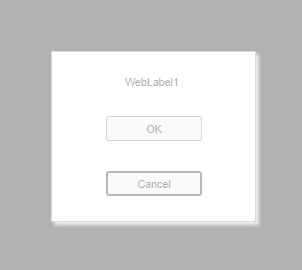
I've just installed TMS WEB Core 2.9.6 and, while I can see that PopupOpacity now has some effect, it's not giving the right result IMHO. If PopupOpacity is set to anything less than 1, the popup form itself is also slightly opaque. For example, this is with 0.3 - the form looks "grayed out":
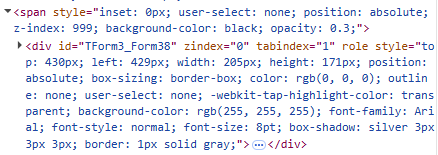
I believe this is because the form (div) is inside the opaque panel (span):
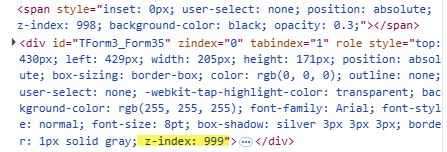
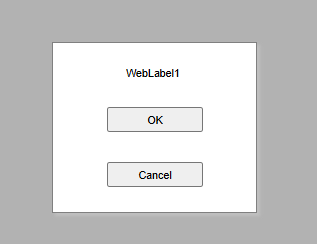
By manipulating the HTML (moving the div beside the span and setting the z-index) I can fix this like this:
Thanks.
We have further improved this but in a different way.
This improvement will be included in the next release.