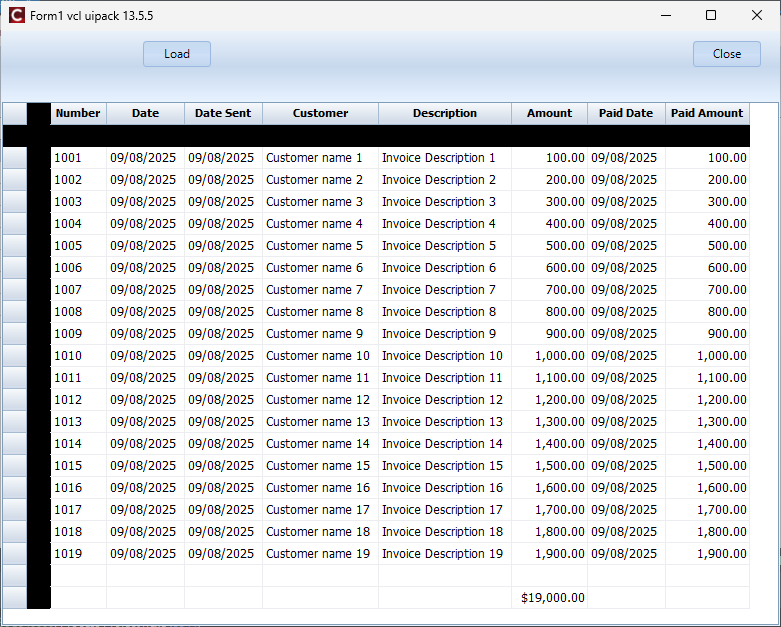
After installing vcl-ui-pack v13.5.5 I noticed black column and row in an ASG:
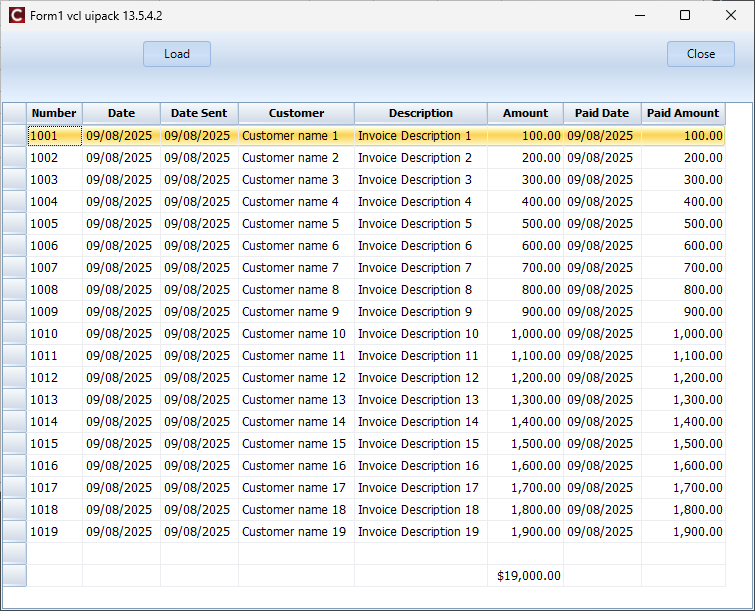
The previous version I was using 13.5.4.2 did not have that issue:
Here is the code. It is a C++Builder project:
asg_code.zip (14.2 KB)
Thanks,
Elias
After installing vcl-ui-pack v13.5.5 I noticed black column and row in an ASG:
The previous version I was using 13.5.4.2 did not have that issue:
Here is the code. It is a C++Builder project:
asg_code.zip (14.2 KB)
Thanks,
Elias
I tested this here with C++Builder 12.3 on Windows 11 but I could not see an issue. The screen here looks the same as your second screenshot. What C++Builder version are you using? What OS?
Do the black rectangles disappear when you call grid.Invalidate or grid.Repaint?
I am using Windows 11 Pro with the latest updates. I tested this with C++Builder 12.2 & 12.3 - with latest updates. I am consistently getting the issue that I described. installing 13.5.5 causes the issue in both 12.2 and 12.3. Uninstalling 13.5.5 and installing 13.5.4.2 solves the issue. calling grid->Invalidate or grid->Repaint did not make any difference.
I first noticed the issue on a project that I have been developing for years and I keep enhancing and maintaining that project. I copied the form that has the issue and created the test project using that form. That grid has been on the form for years.
The issue went away and the grid is working fine when I deleted the grid and replaced it with a new asg. I still would like to figure out why the existing grid is having the issue with the black rectangles.
Thank you for looking into the issue.
Elias
I just installed vcl ui pack 13.5.6 and tested my project with C++ Builder 12.3 - The issue with the black rectangles has been resolved.
Thank you,
Elias