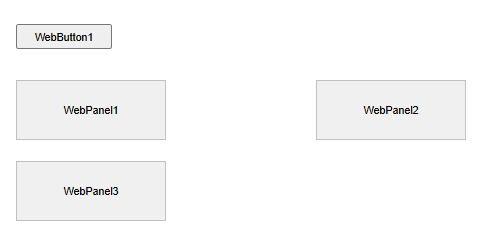
I have a couple of issues with removing controls from a TWebResponsiveGridPanel. Below is my test code: I created a TWebForm, added a TWebButton and a TWebResponsiveGridPanel, then added 3 TWebPanel to the TWebResponsiveGridPanel. Clicking the button is supposed to remove the 2nd panel. Here is the code:
type
  TForm1 = class(TWebForm)
    WebButton1: TWebButton;
    WebResponsiveGridPanel1: TWebResponsiveGridPanel;
    WebPanel1: TWebPanel;
    WebPanel2: TWebPanel;
    WebPanel3: TWebPanel;
    procedure WebButton1Click(Sender: TObject);
  end;

var
  Form1: TForm1;

implementation

{$R *.dfm}

procedure TForm1.WebButton1Click(Sender: TObject);
begin
  WebResponsiveGridPanel1.BeginUpdate;
  WebResponsiveGridPanel1.RemoveControl(WebPanel2);
  WebResponsiveGridPanel1.EndUpdate;
end;
Here is what it looks like:
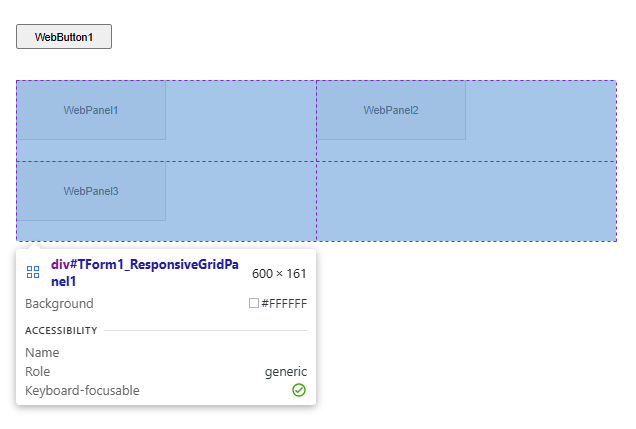
Inspecting the page, I can see that WebResponsiveGridPanel1 is a 2x2 grid, which makes sense with a 2 column layout and 3 controls.
Now I press the button and I get this:
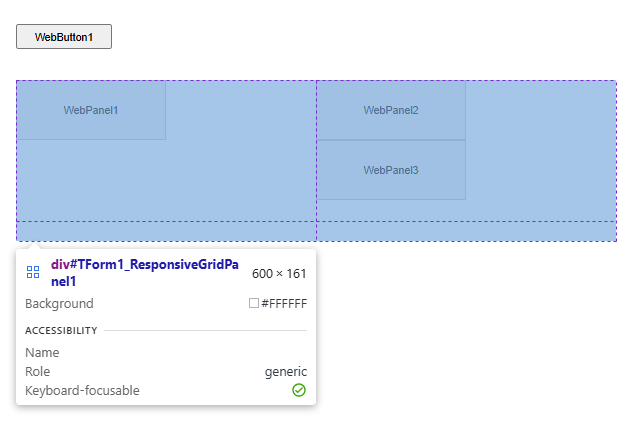
Firstly, why is WebPanel2 still visible? What do I have to do to make it disappear entirely. Even freeing the panel doesn't seem to work. (If I assign WebPanel2 to another parent (eg the form itself) then it is removed from the grid, but then it is shown on the form - I want it gone completely.)
Secondly, WebResponsiveGridPanel1 is still a 2x2 grid, even though it no longer uses the 2nd row. However, that row is still taking up space on the page. How can I remove the 2nd row?
I'm using TMS WEB Core 2.9.6.
Thanks!
