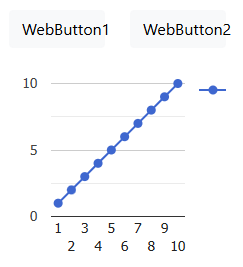
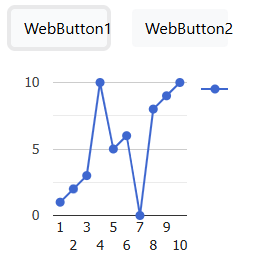
Hi, I'm dynamically updating the points in a TWebGoogleChart as the user does things, but when I later use BeginUpdate/EndUpdate to make other changes, it resets all the updated points to their original values. Here is code to show what I mean:
procedure TForm1.WebFormCreate(Sender: TObject);
var
  series: TGoogleChartSeriesItem;
  i: integer;
begin
  WebGoogleChart1.BeginUpdate;
  try
    WebGoogleChart1.Series.Clear;
    series := WebGoogleChart1.Series.Add;
    series.ChartType := gctLine;
    for i := 1 to 10 do
      series.Values.AddSinglePoint(i, IntToStr(i));
  finally
    WebGoogleChart1.EndUpdate;
  end;
end;

procedure TForm1.WebButton1Click(Sender: TObject);
var
  data: TJSObject;
  chart: TJSObject;
begin
  data := WebGoogleChart1.Data;
  chart := WebGoogleChart1.Chart;
  asm
    data.setValue(3, 1, 10);
    data.setValue(6, 1, 0);
    chart.draw();
  end;
end;

procedure TForm1.WebButton2Click(Sender: TObject);
begin
  WebGoogleChart1.BeginUpdate;
  try
  finally
    WebGoogleChart1.EndUpdate;
  end;
end;
Even though pressing button 2 does nothing other than BeginUpdate and EndUpdate, it resets the graph back to the original straight line.
Am I doing something wrong?
Thanks!
This is expected. When you call chart.BeginUpdate/chart.EndUpdate, the chart.EndUpdate method will rerender the chart based on the points added to the Pascal class.
If you change points behind the back of the Pascal class via a JavaScript call, this isn't seen by the Pascal class, hence, it can't take these changes in account when doing a re-render.
It's slightly odd that I need to change the 'X' value in this case, but it works! Note also that the changes are not rendered without the BeginUpdate ... EndUpdate.
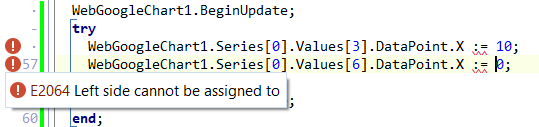
While we're here, do you know why the IDE shows the error below? It nevertheless compiles and runs.
I installed TMS WEB Core using TMS Smart Setup. If I search within the Products/tms.webcore folder for *.pas files containing TGoogleChartDataPoint I find 2 of them:
And they are different! Is that normal? In noticed that in class TGoogleChartSeriesValueItem, in the first file property DataPoint is public, but in the second file it is published. Could that be the problem?
I also noticed that I have 2.9.1 installed and 2.9.3 is available. I could upgrade if that might help.
In your IDE library path, only the folder ...\Products\tms.webcore\Component Library Source\ should be added.
The folder ...\Products\tms.webcore\Core Source\ is for the TMS WEB Core library path only.
By "IDE library path" do you mean Tools > Options... then Language > Delphi > Library > Library Path? It only had ...\Products\tms.webcore\Packages\d12\Win32\Release (similar to all my other TMS products). I tried adding ...\Products\tms.webcore\Component Library Source but it doesn't seem to have fixed the problem.
FTR, under TMS WEB > Options > Library Path it has $(TMSWebDir)\Core Source\*
I have a number of 3rd party tools, but how could they interfere? I tried removing them all from the library path but it made no difference.
After doing some Googling, it seems like this is an expected issue with properties that are records. Perhaps the question should be: why are you NOT getting the issue?
If I change the definition of TGoogleChartSeriesValueItem from this:
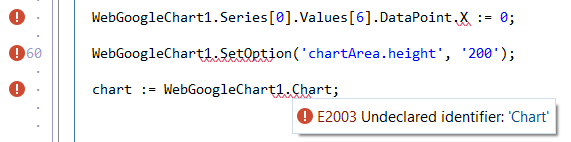
I don't know how this really works, but when I view the source code for TWebGoogleChart (in Component Library Source) it really doesn't have SetOption or Chart defined. They are in the Core Source version of the file, though.
As above, this nevertheless does compile and run fine.
I've just upgrade to WEB Core 2.9.3 and still have these issues.
We have seen this in 12.3 and it appears to be related to the LSP.
The pas2js transpiler perfectly transpiles this code, it is just the Delphi LSP that confuses this and doesn't take this pas2js transpiler capability in account.
If you do not like this LSP error, you could put code like this in a block
{$IFDEF PAS2JS}
{$ENDIF}
or assign directly as record.
We'll look at your suggestion to change the declaration in the class to make the LSP happy.