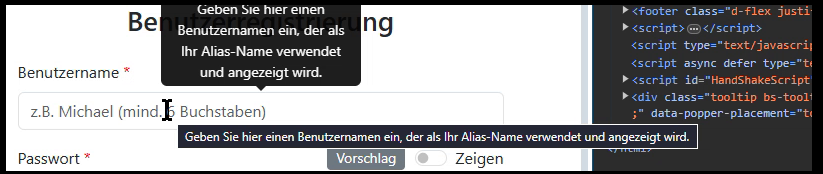
Entered a Hint on a TWebEdit, set ShowHint to true and when I hover the edit, this is the result I see in the browser:
So it's Bootstrap showing the Hint (aka tooltip) above the edit as well as it's shown the classic VCL style below the edit.
Here is the relevant HTML:
      <div class="row">
        <div class="col-md-6">
          <div class="form-group mb-3">
            <label for="EdUsername" class="form-label required">Benutzername</label>
            <input type="text" class="form-control" id="EdUsername" required>
How to decide for just the one or the other method, but not both?
Thank you!
I tested this with your HTML template and with Bootstrap 5.2.3 enabled and added the code
procedure TForm3.WebButton1Click(Sender: TObject);
begin
  webedit1.Hint := 'test';
  webedit1.SHowHint := true;
end;
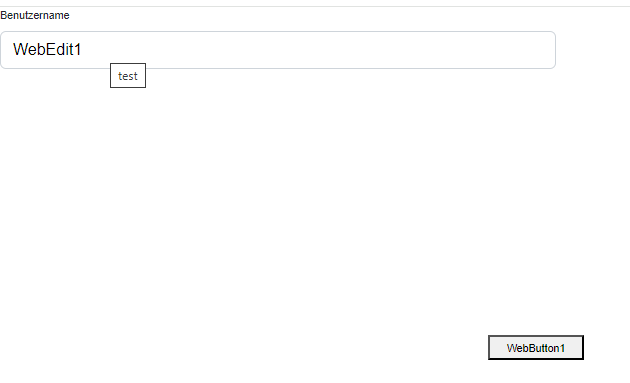
but I could not see this behavior here. Setting the hint for the edit in code just adds the title attribute to the HTML INPUT element.
If I enter the Hint at design time, I get the behaviour I described above, which is both types of hints are displayed.
If I add the Hint at runtime, as you did, I get the Bootstrap style hint only (no VCL-style hint is shown and no title attribute is added). Tested with both, Bootstrap 5.2.3 as well as current 5.3.3. But I also load a couple more js libraries (jquery,popper,leaflet), which may make a difference.
If I only want the "VCL style" hint only, which I do, I need to add the Hint at design time and do the following (ChatGPT is my hero...):
- Add "data-bs-toggle="tooltip"" to the input element, like so
    <input type="text" class="form-control" id="EdUsername" required
      data-bs-toggle="tooltip">
- Add script to execute during WebFormShow(), which disables all Bootstrap style tooltips (being tagged as above) but leaves VCL-style hints enabled:
    $(document).ready(function(){
      $('[data-bs-toggle="tooltip"]').tooltip('disable');
    });
Thanks for informing about the solution found.