Styling FNC components

FNC components adhere to standard FMX styling via Tstylebook, this is quite cool and an improvement. However, the renderings in detail are suboptimal in some places:

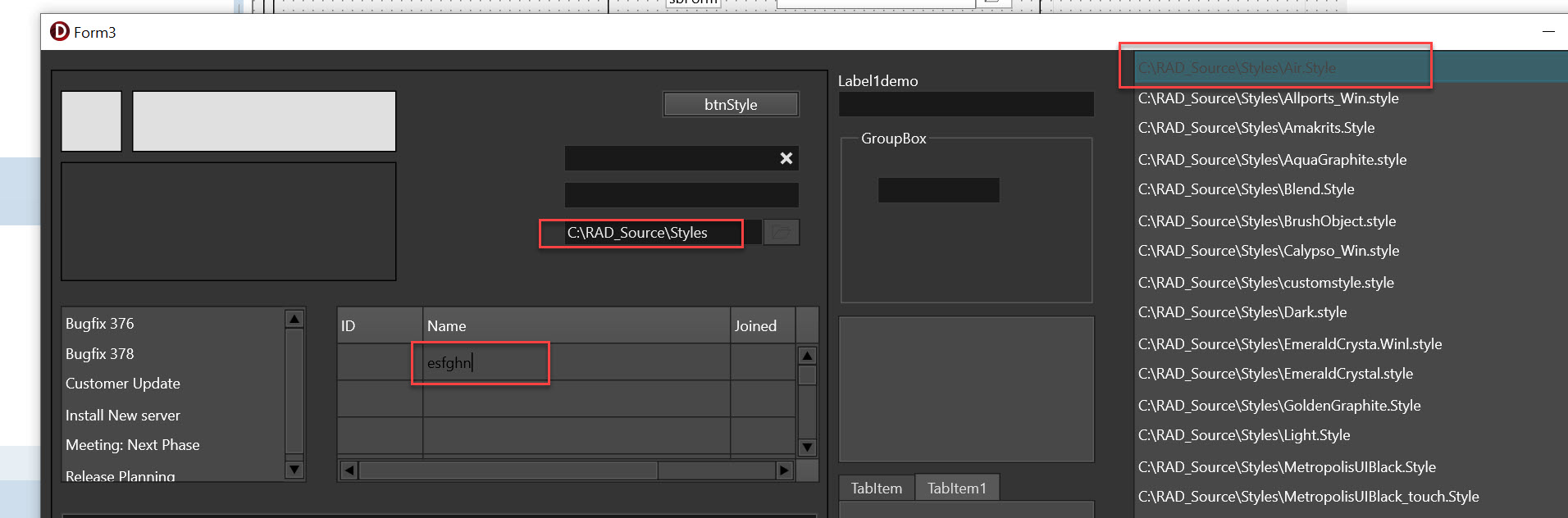
This is the Air Style, which i9s a dark mode style. Here the TFNCDirectoryEdit is not rendered the same as the TFNCEdit - and I think it should.

Also when edeiting theb grids data, the font is black in dark grey which is not like the rendering in the edits, which is white on dark grey.

Is there room for improvement?

Thanks a lot!

1 Like

Hi,

TTMSFNCDirectoryEdit is using a TTMSFNCEdit + TTMSFNCToolBarButton. From your screenshot it's not immediately clear what is rendered differently. Can you please clarify what should we look for exactly?

There should be a yellow frame around the control when entered to edit. This frame is somewhat hidden. Just give it a try, you will see it.

In TTMSFNCDirectoryEdit the TTMSFNCEdit is a child control. It's being cut off because the ClipChildren property is set to True by default. We'll look to make False the default value but in the meantime you can simply set it to False manually.
This topic was automatically closed 24 hours after the last reply. New replies are no longer allowed.