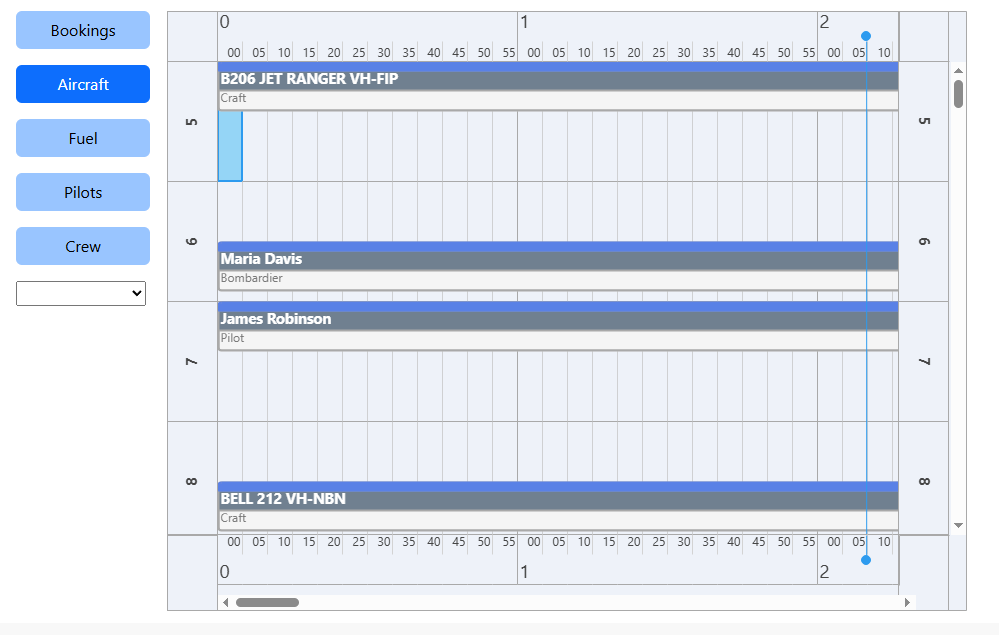
My issue is the position of the Position/Resource, not the timeline (atm). Its suspicious as there are 5 positions loaded by default. But I am clearing the collections/lists.
I will try the event once I have exhausted other settings, thanks
I am doing a Items.Clear and Items.Count is indeed 0. However, the first item I create gets the ID=5. That's what was throwing me. There is no offset, all my items are in view, its just that the ID starts at 5.
The first time it starts with 5. If I then switch to a different Resource Type (say Pilots to Fuel), it continues from what it had reached to.
Its an internal ID, but it never resets. I am Clearing Items and Resources. Do I have to clear some other collection/list ?
procedure TPln_Data.dba_ItemRead
          (Sender : TObject;
           AItem  : TTMSFNCPlannerItem);

var
  LRes_Ref     : Int64;
  LRes_Ref_Str : string;

  procedure Get_Custom_Data;
  var
    LExtra : TPln_Extra_Data;
  begin
    LExtra := TPln_Extra_Data(AItem.DataObject);
    if Assigned (LExtra)
    then begin
         LRes_Ref := LExtra.Resource_Ref;
    end
    else begin
         LRes_Ref := 0;
    end;
    LRes_Ref_Str := IntToStr (LRes_Ref);
  end;

  function New_Resource_Name : string;
  var
    LName : string;
  begin
    case FPlanner of
      pt_Pilots   : LName := PL.Pilot_Data    [LRes_Ref]._Display;
      pt_Crew     : LName := PL.Crew_Data     [LRes_Ref]._Display;
      pt_Aircraft : LName := PL.Aircraft_Data [LRes_Ref]._Display;
      pt_Fuel     : LName := PL.Fuel_Data     [LRes_Ref]._Display;
      else          LName := '';
    end;
    if FShow_Res_Ref
    then Result := LName + '(' + LRes_Ref_Str +  ')'
    else Result := LName;
  end;

  procedure Assign_Resource_Number;
  var
    LRes_Idx_Str : string;
    LRes_Idx     : Integer;
    LPln_Res     : TTMSFNCPlannerResource;
  begin
    { Index to Planner Resources Collection }
    LRes_Idx_Str := FResource.Data [LRes_Ref_Str];

    if LRes_Idx_Str = ''
    then begin
         LPln_Res      := Fpln.Resources.Add;
         LPln_Res.Text := New_Resource_Name;
         LRes_Idx      := LPln_Res.Index;
         { Store the Planner Resources Index }
         FResource.Data [LRes_Ref_Str] := IntToStr (LRes_Idx);
         TConsole.Log ('dba_ItemRead - Added resource', LRes_Ref_Str);
    end
    else begin
         TryStrToInt (LRes_Idx_Str, LRes_Idx);
    end;
    AItem.Resource := LRes_Idx;
  end;

(*
var
  LID          : Int64;
  LPln_Res_Ref : string;
*)
begin
(*
  LID           := AItem.ID;  // First ID is 5 for some reason  <-------------------------------------------
  LPln_Res_Ref  := AItem.DBKey;
*)
  Get_Custom_Data;
  Assign_Resource_Number;

   { TODO 1 -oFeature -cUrgent : Put Def Pilot/Crew in setup }
   { TODO 1 -oFeature -cUrgent : Use Filter and Order by Ref/Start_Time}
end;