My environment: Delphi 12.1, VCL UI Pack V 13.4.0.0
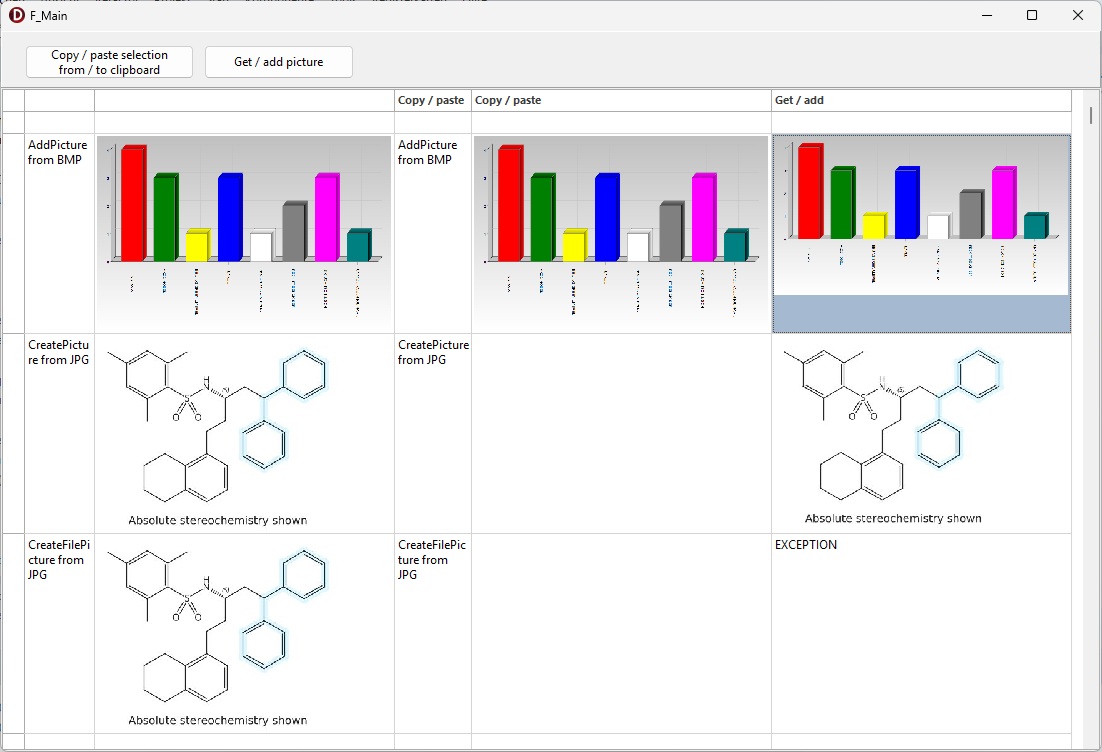
The screenshot shows part of an Advstringgrid with text and images. What I like to do: to select the 2 rows with images and paste them at another row of the grid. How can this be done?
The images in the grid are NOT of type filepicture, but type picture.
A solution would be highly appreciated. With best regards Heinz-Gerd Kneip
Try to set
grid.Navigation.AllowFmtClipboard = true
"Navigation.AllowFmtClipboard := true" had been used as you recommended. But the situation obviously is more complex: please cf the added sample program.
What you see in the screenshot:
- When starting the program the images in column 2 have been created; the method and the file extension are shown column 1.
- Click on the copy / paste button, which shall copy columns 1 and 2 to 3 and 4 with CopySelectionToClipboard and PasteSelectionFromClipboard
- Click on the Get / Add picture button to copy the images from column 2 to 5 The image from column 2 is copied with GETPICTURE and pasted with ADDPICTURE in column 5.
PicturesAdvstringgridCopyPaste.zip (118.6 KB)
My plan is to copy the selection text and image from columns 1 and 2 (from >=1 rows) to columns 3 and 4. Where is my mistake? Is it a question of the file extension? Or a wrong or missing feature in the used TAdvStringGrid asg settings?
May you advise me how to go forward?
Best regards Heinz-Gerd Kneip
Using grid.CreatePicture() creates the picture instance in the scope of the grid itself. As the picture instance lives in the grid where it is created, the grid where it is copied to can't access it and doesn't display it.
When you use AddPicture, the picture lives in the scope of the form or application and can as such be accessed from multiple grids (after clipboard copy).
So, changing the code to:
procedure TF_Main.FormCreate(Sender: TObject);
begin
  asg.Cells[1, 4] := 'CreateFilePicture from JPG';
  asg.Cells[1, 3] := 'CreatePicture from JPG';
  asg.Cells[1, 2] := 'AddPicture from BMP';
  asg.Cells[3, 0] := 'Copy / paste';
  asg.Cells[4, 0] := 'Copy / paste';
  asg.Cells[5, 0] := 'Get / add';
  asg.RowHeights[2] := 200;
  asg.RowHeights[3] := 200;
  asg.RowHeights[4] := 200;
  asg.ColWidths[0] := 22;
  asg.ColWidths[1] := 70;
  asg.ColWidths[2] := 300;
  asg.ColWidths[3] := 70;
  asg.ColWidths[4] := 300;
  asg.ColWidths[5] := 300;

  asg.ExcelClipboardFormat := true;
  asg.Navigation.AllowFmtClipboard := true;

  ACopiedPic := TPicture.Create;
  ACopiedPic.LoadFromFile('.\TmpReport1.bmp');
  asg.AddPicture(2, 2, ACopiedPic, true, Stretch, 2, haLeft, vaTop);

  pic := TPicture.Create;
  pic.LoadFromFile('.\test.jpg');

  asg.AddPicture(2,3, pic, true, StretchWithAspectRatio, 0, haLeft, vaTop);
  asg.AddPicture(2,4, pic, true, StretchWithAspectRatio, 0, haLeft, vaTop);
end;
helps