1. Summary
In a TMS WEB Core for Visual Studio Code TypeScript project, setting the Align property of a TWebPanel to alBottom causes an uncaught runtime exception in WEBLib.Forms.ts.
The exception indicates that appendChild is being called on a null object. As a result, form initialization stops and the browser displays a completely blank page.
The issue is reproducible in a newly created project containing only one TWebPanel, without any user-written event handlers or custom application code.
2. Product and Environment
- Product: TMS WEB Core for Visual Studio Code
- Project type: TypeScript
- IDE: Visual Studio Code
- Operating system: Windows 11
- Browser: Google Chrome
- Development server: Webpack Development Server
- TMS WEB Core version: [Please enter the installed version]
- TMS WEB Core VS Code extension version: [Please enter the installed version]
@tmssoftware/webcoreversion: [Please enter the version frompackage.json]- Node.js version: [Please enter the installed version]
- npm version: [Please enter the installed version]
3. Problem Description
A new TMS WEB Core TypeScript project was created in Visual Studio Code.
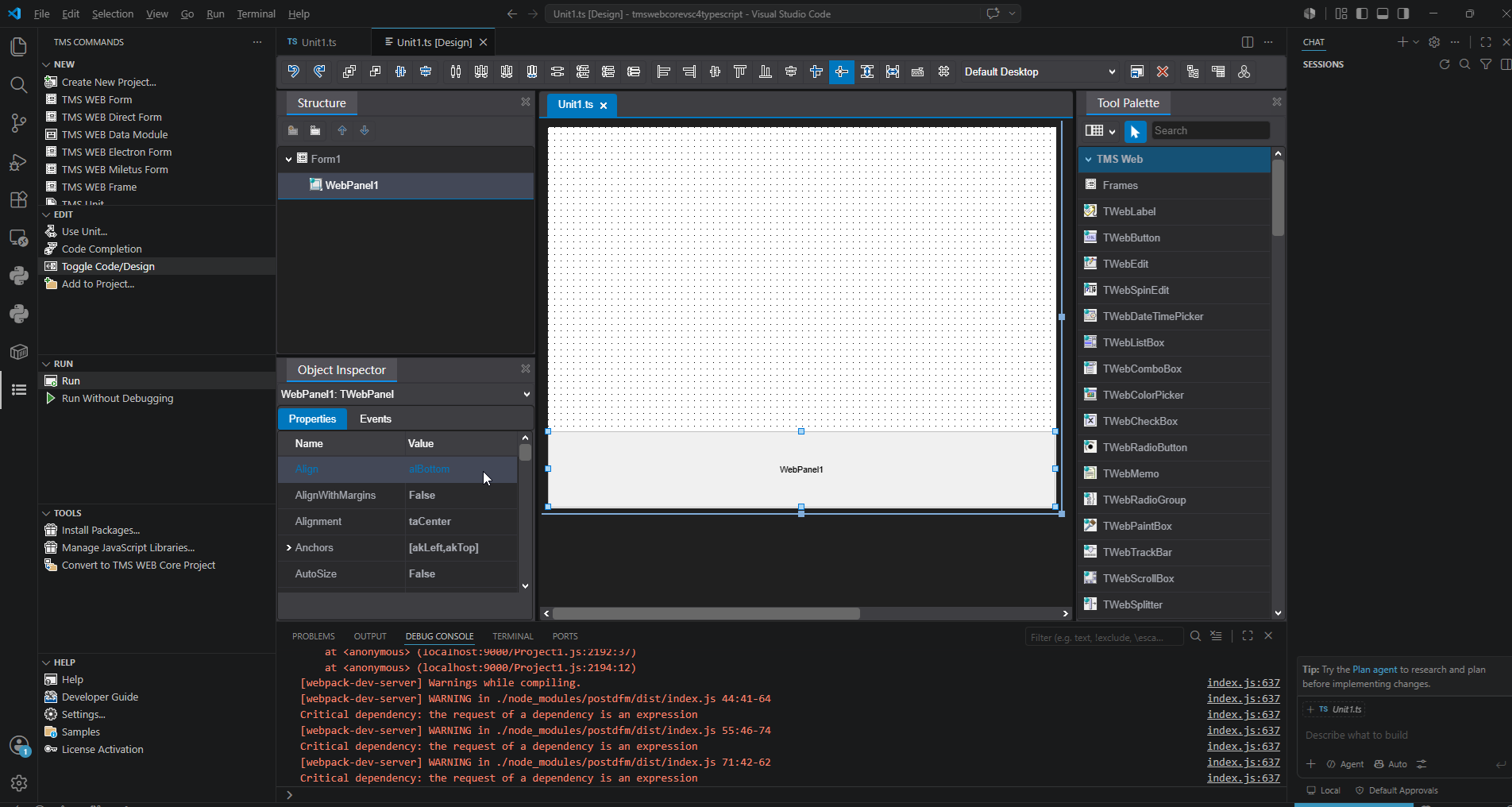
A TWebPanel was then placed on the default form, and its Align property was set as follows:
Component: TWebPanel
Align:     alBottom
When the project is run, an exception occurs inside WEBLib.Forms.ts because appendChild is called on a null object.
The form initialization process is interrupted, and neither the form nor the panel is displayed in the browser.
4. Steps to Reproduce
- Start Visual Studio Code.
- Create a new TMS WEB Core project.
- Select the TypeScript project type.
- Open the newly created form in the visual designer.
- Place one
TWebPanelon the form. - Select the
TWebPanel. - Set its
Alignproperty toalBottomin the Object Inspector. - Save the project.
- Run or debug the project.
- Check the Visual Studio Code Debug Console.
- Open Chrome Developer Tools and check the Console.
- Observe that the browser page remains blank.
5. Actual Result
5.1 Visual Studio Code Debug Console
The following runtime error is displayed:
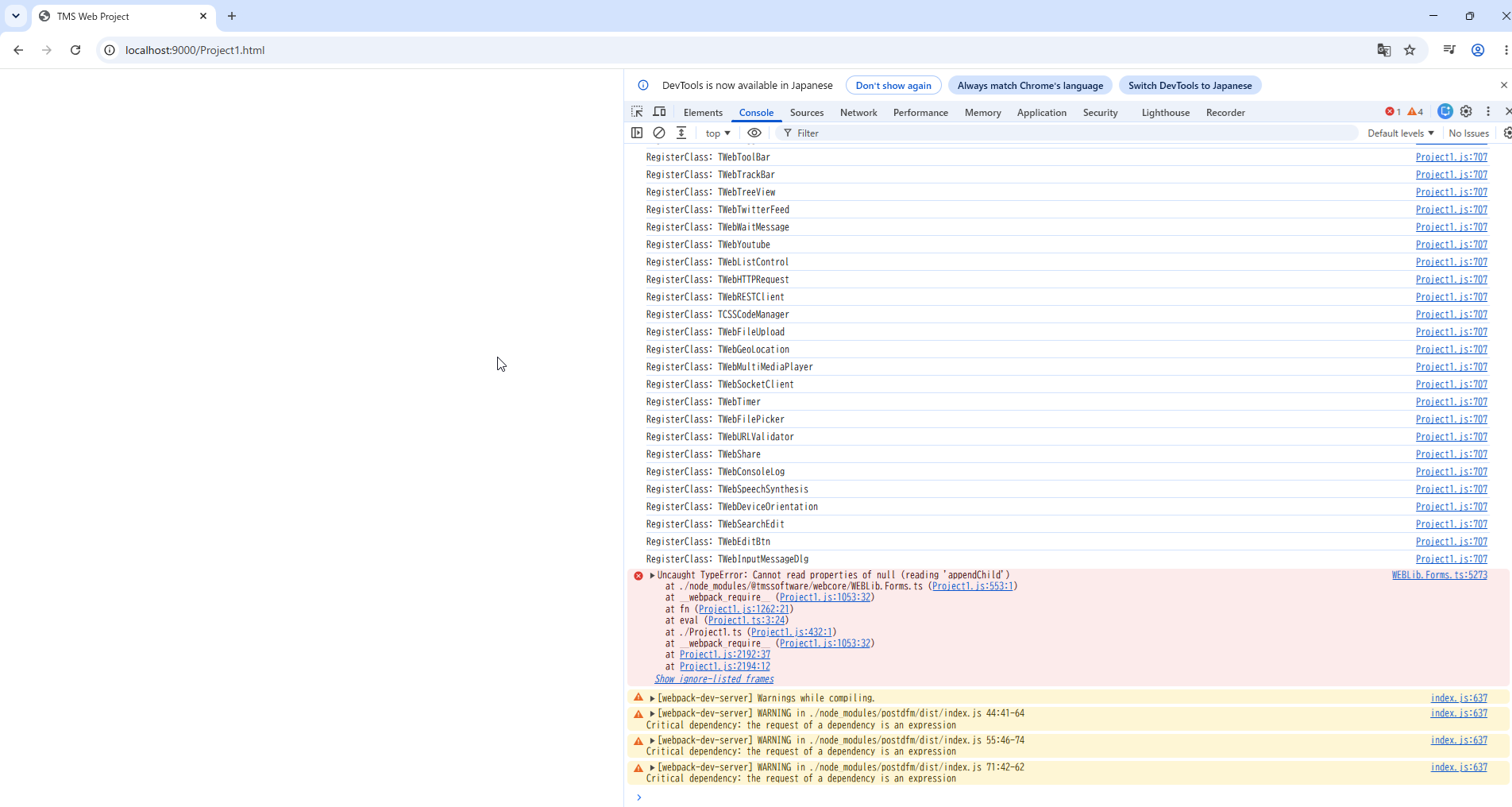
Uncaught TypeError TypeError: Cannot read properties of null (reading 'appendChild')
    at eval (c:\Users\mahihima8855\mahiLessons\tmswebcorevsc4typescript\node_modules\@tmssoftware\webcore\WEBLib.Forms.ts:5274:1)
    at ./node_modules/@tmssoftware/webcore/WEBLib.Forms.ts (localhost:9000/Project1.js:553:1)
    at __webpack_require__ (localhost:9000/Project1.js:1053:32)
    at fn (localhost:9000/Project1.js:1262:21)
    at eval (c:\Users\mahihima8855\mahiLessons\tmswebcorevsc4typescript\Project1.ts:3:24)
    at ./Project1.ts (localhost:9000/Project1.js:432:1)
    at __webpack_require__ (localhost:9000/Project1.js:1053:32)
    at <anonymous> (localhost:9000/Project1.js:2192:37)
    at <anonymous> (localhost:9000/Project1.js:2194:12)
The following Webpack warnings are also displayed:
[webpack-dev-server] Warnings while compiling.

[webpack-dev-server] WARNING in ./node_modules/postdfm/dist/index.js 44:41-64
Critical dependency: the request of a dependency is an expression

[webpack-dev-server] WARNING in ./node_modules/postdfm/dist/index.js 55:46-74
Critical dependency: the request of a dependency is an expression

[webpack-dev-server] WARNING in ./node_modules/postdfm/dist/index.js 71:42-62
Critical dependency: the request of a dependency is an expression
It is currently unclear whether these Webpack warnings are directly related to the appendChild exception.
5.2 Chrome Developer Tools Console
The following exception is displayed in Chrome:
WEBLib.Forms.ts:5273 Uncaught TypeError: Cannot read properties of null (reading 'appendChild')
    at eval (WEBLib.Forms.ts:5273:19)
    at ./node_modules/@tmssoftware/webcore/WEBLib.Forms.ts (Project1.js:553:1)
    at __webpack_require__ (Project1.js:1053:32)
    at fn (Project1.js:1262:21)
    at eval (Project1.ts:3:24)
    at ./Project1.ts (Project1.js:432:1)
    at __webpack_require__ (Project1.js:1053:32)
    at Project1.js:2192:37
    at Project1.js:2194:12
5.3 Browser Output
The application area remains completely blank.
No form and no TWebPanel are displayed.
6. Expected Result
When TWebPanel.Align is set to alBottom, the expected behavior is:
- The form is created normally.
- The
TWebPanelis displayed at the bottom of the form. - The panel width is adjusted to the client width of its parent container.
- No JavaScript or TypeScript runtime exception occurs.
- Other controls on the form remain visible and operational.
This behavior should be consistent with the Delphi version of TMS WEB Core.
7. Reproducibility
The issue is reproducible using the same procedure.
Reproducibility: Always
Because the problem occurs in a newly created minimal project, it does not appear to be caused by existing application code or project-specific customization.
8. Minimal Reproduction Conditions
No custom event handler or additional source code is required.
The minimum conditions are:
1. Create a new TMS WEB Core TypeScript project.
2. Place one TWebPanel on the default form.
3. Set TWebPanel.Align to alBottom.
4. Run the project.
This suggests that the issue may be located in one of the following areas:
- TypeScript runtime initialization
- DFM processing
- Form DOM creation
- Parent-child component association
- Alignment processing
- Initialization order between DOM creation and alignment
9. Suspected Area
The stack trace points to the following file:
node_modules/@tmssoftware/webcore/WEBLib.Forms.ts
Depending on the console, the failing location is reported as:
WEBLib.Forms.ts:5273
WEBLib.Forms.ts:5274
The exception suggests that code conceptually similar to the following is being executed while the parent element is null:
parentElement.appendChild(childElement);
Possible causes to investigate include:
- Alignment processing starts before the form's root DOM element is created.
- The parent DOM element of the
TWebPanelcannot be found. - The DOM element ID generated from the DFM does not match the ID expected by the runtime.
- The
postdfmconversion does not preserve the required parent-child relationship. - Module initialization occurs before the required DOM container is available.
- The
alBottomimplementation assumes that a parent client element has already been initialized. - The form root element lookup uses an incorrect selector or element ID.
These are only hypotheses based on the stack trace. A detailed investigation by the TMS WEB Core development team is requested.
10. Scope and Impact
The Align property is a fundamental feature for constructing form layouts.
Because setting Align to alBottom prevents the entire form from being displayed, the impact is significant.
Please also verify whether the same problem affects the following values:
alTop
alBottom
alLeft
alRight
alClient
It would also be useful to test other container controls that may share the same alignment or DOM-parenting implementation.
11. Temporary Workaround
A possible temporary workaround is to avoid using the Align property:
Align = alNone
The position and size of the component can then be configured manually using properties such as:
LeftTopWidthHeightAnchors
However, this workaround is not sufficient for responsive layouts and cannot be considered a permanent solution.
12. Requested Investigation and Fix
Please investigate and correct the following points:
- Determine why the parent object used by
appendChildisnullwhenTWebPanel.Alignis set toalBottom. - Ensure that alignment processing starts only after the form and its parent DOM elements have been created.
- Verify that DFM conversion correctly preserves component ownership and parent-child relationships.
- Add defensive error handling or a more descriptive error message when the expected parent DOM element cannot be found.
- Test
alTop,alLeft,alRight, andalClientfor the same problem. - Perform regression testing with other container controls.
- Confirm the fix using a newly created minimal TypeScript project.
13. Attachments
Attachment 1: Visual Studio Code Designer
The image shows a newly created TMS WEB Core TypeScript project with one TWebPanel placed on the form.
The panel property is set to:
Align = alBottom
Attachment 2: Browser and Console Output
The image shows:
- A completely blank application page.
- Chrome Developer Tools displaying the
appendChildexception. - The exception originating from
WEBLib.Forms.ts.
Attachement1:
Attachement2: