Subject:
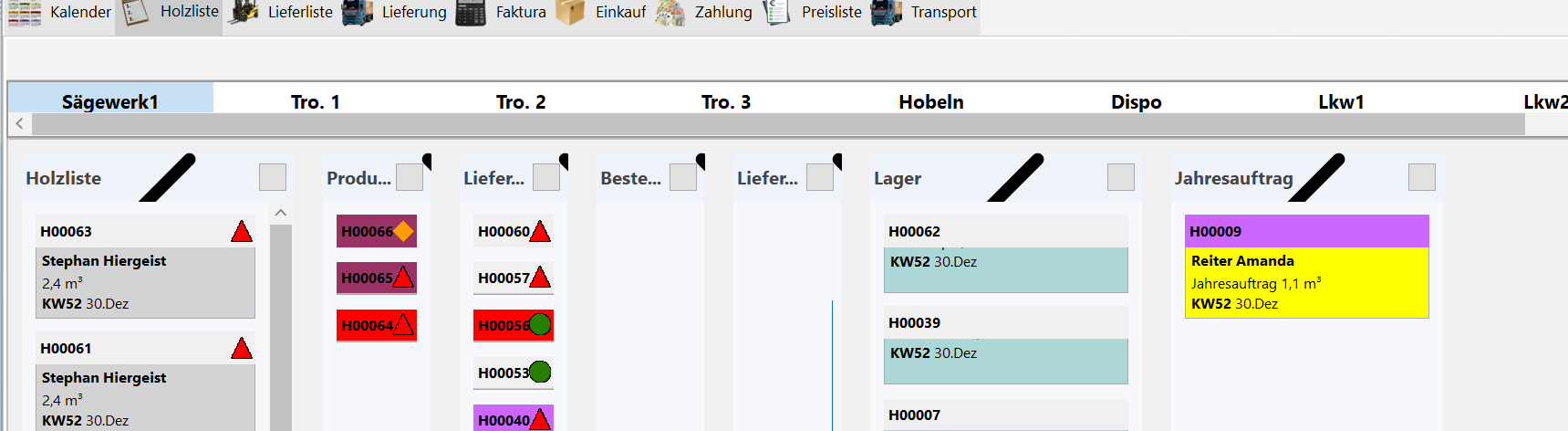
TMS FNC Kanban Board – Expand/Collapse icons are rendered incorrectly
I found a rendering issue with the Expand/Collapse buttons in TMSFNCKanbanBoard.
The Expand/Collapse button in the column header should display a small arrow icon, as shown in the second screenshot.
Instead, the icon is sometimes rendered incorrectly as a large black diagonal shape extending across the column header, as shown in the first screenshot.
Expected behavior:
The Expand/Collapse icon should be displayed at its normal size inside the button.
Actual behavior:
The icon appears to be incorrectly scaled or rendered and is displayed as a large black diagonal bar.
This occurs in a Delphi VCL application using TMSFNCKanbanBoard.