Hi,
The attach command is for attaching files inside the PDF. They can be any file, not just images, but they will show only in the attachments pane, not as a part of the document. You can find an example here: Exporting to PDF/A (Delphi) | FlexCel Studio for VCL and FireMonkey documentation
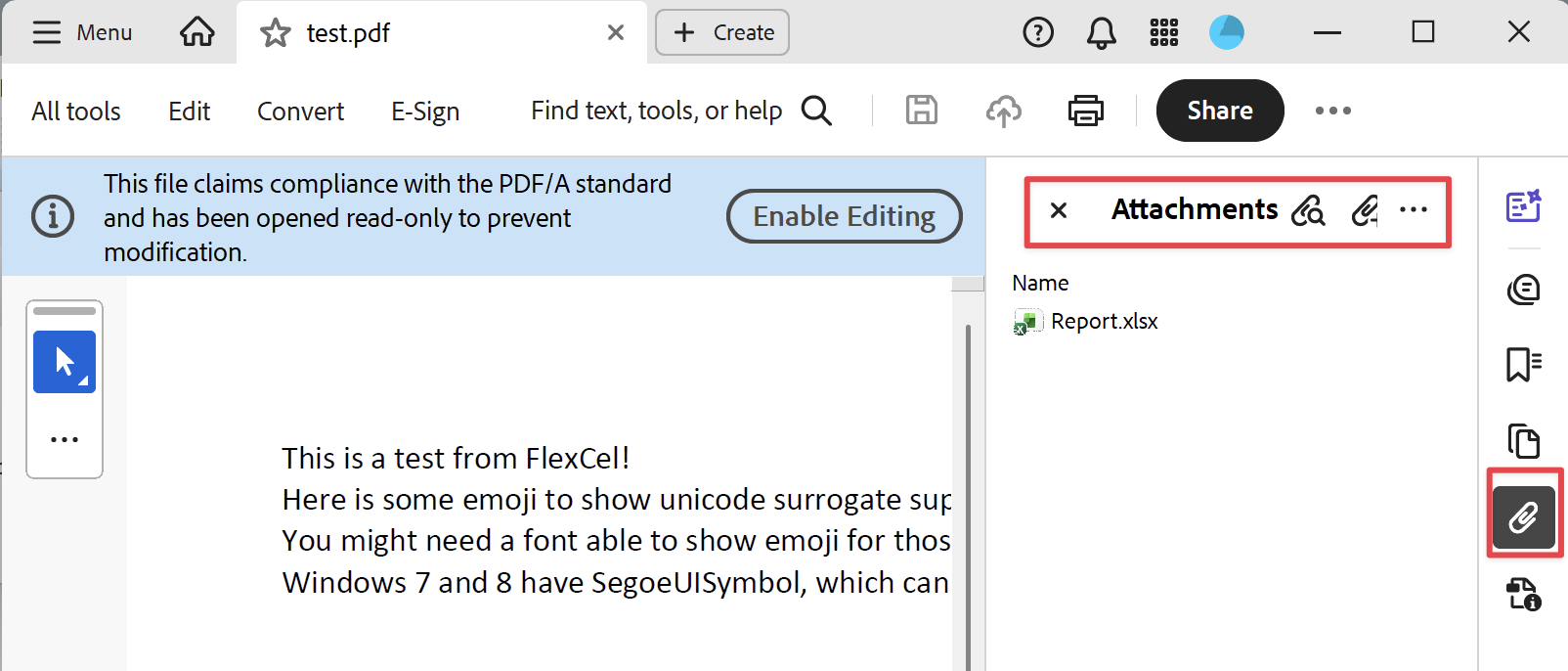
And to see the attached file, you need to open the "Attachment" pane in Acrobat:
If I understood correctly, what you want to do is just to add some images to the document? (not attach files, but just add images). If that is the case, then I see 3 possibilities:
-
You can just add the images to the grid before exporting the grid.
-
You can just add the image to xls object you are exporting. After the line:
AdvGridExcelExport.Export(xls);
You can use xls.AddImage to add the images. You can find an example here: Getting started (Delphi) | FlexCel Studio for VCL and FireMonkey documentation
- You can add it to the pdf document, using the AfterGeneratePage event. You can find an example here: Exporting Excel files to PDF (Delphi) | FlexCel Studio for VCL and FireMonkey documentation
Specifically, in the part that prints "confidential" in every page (there is a checkbox at the bottom of the app that does this):
procedure TFExportPdf.PdfExport_AfterGeneratePage(const sender: TObject; const e: TPageEventArgs);
var
  ABrush: TUIBrush;
  AFont: TUIFont;
  x0: RealNumber;
  y0: RealNumber;
  sf: TUISize;
const
  s = 'Confidential';
begin
  if not cbConfidential.Checked then
    exit;

  ABrush := TUISolidBrush.CreateNew(TUIColor.FromArgb($1E, $19, $19, $19));  //Red=Green=Blue is a shade of gray. Alpha=30 means it is transparent (255 is pure opaque, 0 is pure transparent).
  try
    AFont := TUIFont.CreateNew('Arial', $48);
    try
      x0 := ((e.DataFile.PageSize.Width * 72) / 100) / 2;  //PageSize is in inches/100, our coordinate system is in Points, that is inches/72
      y0 := ((e.DataFile.PageSize.Height * 72) / 100) / 2;
      sf := e.DataFile.MeasureString(s, AFont);
      e.DataFile.Rotate(x0, y0, $2D);
      e.DataFile.DrawString(s, AFont, ABrush, x0 - (sf.Width / 2), y0 + (sf.Height / 2));  //the y coord means the bottom of the text, and as the y axis grows down, we have to add sf.height/2 instead of substracting it.
    finally
      FreeAndNil(AFont);
    end;
  finally
    FreeAndNil(ABrush);
  end;
end;
This code will print confidential in every page, you would need to check it is the last page too if you want only the image in one page. It also draws a semi-transparent text, (the TUIColor has an alpha component), and also draws a string (you would draw an image instead, using DrawImage instead of DrawString as in the example code). There is an example of using DrawImage to draw an image to a pdf here: Creating pdf files with the PDF API (Delphi) | FlexCel Studio for VCL and FireMonkey documentation
About what to use, it depends on what you prefer. Option 1 might be the simpler, but it means you need to remove the image after exporting the grid.
I think I would personally prefer option 2 for simple images, but you need to know the cells in the grid where you want to add them. Option 3 is normally better if you only care about adding the images to the pdf but not to the exported xlsx too, and it is better if you need more control, for example to add an image to every even page, not just at the end. Also it uses "pdf coordinates" which are just "points" (1/20 of an inch) and might be simpler to calculate than "excel coordinates" which you need for option 2 (you need to know the row and column where you are going to put the image). But it depends on your needs. Sometimes you do know the row and column, but not the position of the image in the page. For that cases, option 2 will be simpler.