I need to enter a new Registration Code into the TMS Smart Setup command prompt. When I use the command "tms credentials" I can type the emailed address, but it will not allow me to type in the new Registration Code. I have included a picture of the command prompt. How do I enter a new registration code?
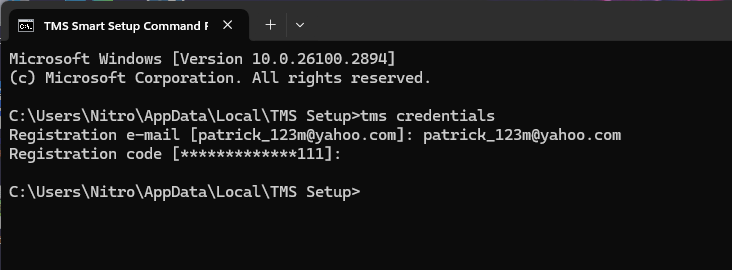
You can type the registration code. It just doesn't echo to screen what you typed, for security purposes. Just type and press enter.
You can also use
tms credentials -print
To see the existing saved credentials.
I have extended my TMS subscription and have a new Registration Code. I am trying to use the TMS Smart Setup command line to update my Registration Code. I have tried the commands 1)tms credentials 2)tms credentials code 3)tms code but I am getting the error message Unknown Option. The picture below shows my command line app. Can you show me the correct command I use to update my Registration Code. I am checking the value of the code using the command: tms credentials -print
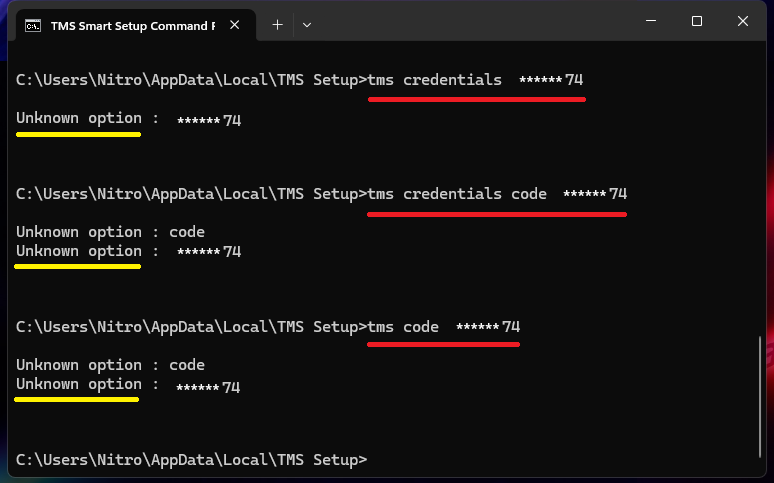
You just run
tms credentials
and then you get 2 prompts to enter your email & password:
