- Versione installata (v1.7.4.1)
- Versione installata di Ollama (ultima)
- modello Ollama (
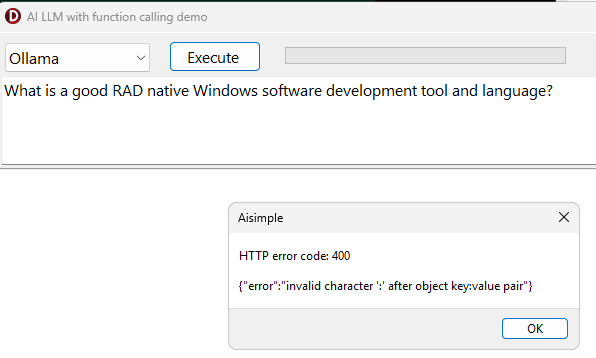
qwen3.5:9b, ~40s di risposta) - errore esatto
{"error":"invalid character ':' after object key:value pair"} TMSMCPCloudAInon espone un modo per configurare il timeout, dato che non è documentato pubblicamente.
Can you please enable logging and send us the log file so we can inspect?
Are you sending special characters or binaries via the context?
Did you test Ollama with another model, like llama3.x ?
20260731T102152: Nr. of tools:0
20260731T102152: {"model": "qwen3.5:9b","messages": [ {"role":"user","content":"Come si chiama la capitale della Tanzania?"} ],"tools": [ ],"stream": false,"options":{"temperature":"temperature": 0.7,,"num_predict":null},"think": false}
20260731T102152: POST body: {"model": "qwen3.5:9b","messages": [ {"role":"user","content":"Come si chiama la capitale della Tanzania?"} ],"tools": [ ],"stream": false,"options":{"temperature":"temperature": 0.7,,"num_predict":null},"think": false}
20260731T102152: Executing request with url: [localhost:11434/api/chat]
20260731T102152: Result from request is {"error":"invalid character ':' after object key:value pair"}
20260731T102152: Result from request is {"error":"invalid character ':' after object key:value pair"}
20260731T102635: Nr. of tools:0
20260731T102635: {"model": "gemma4:12b ","messages": [ {"role":"user","content":"Come si chiama la capitale della Tanzania?"} ],"tools": [ ],"stream": false,"options":{"temperature":"temperature": 0.7,,"num_predict":null},"think": false}
20260731T102635: POST body: {"model": "gemma4:12b ","messages": [ {"role":"user","content":"Come si chiama la capitale della Tanzania?"} ],"tools": [ ],"stream": false,"options":{"temperature":"temperature": 0.7,,"num_predict":null},"think": false}
20260731T102635: Executing request with url: [localhost:11434/api/chat]
20260731T102635: Result from request is {"error":"invalid character ':' after object key:value pair"}
20260731T102635: Result from request is {"error":"invalid character ':' after object key:value pair"}
I tried with other LLM but same response, and I send only: 'Come si chiama la capitale della Tanzania?
'
Do you use the latest version of TMS AI Studio?
I retested this here both with the default model llama3.2 as well as qwen3.5:latest and out of the demo it works fine here.
Can you make sure you use the latest version of TMS AI Studio and you might want to include the code that sets the timeout to a higher value, i.e.
TMSMCPCloudAI.Request.ConnectTimeOut := 600000;
TMSMCPCloudAI.Request.ReadTimeOut := 600000;
Please send me your demo
The demo is included in the product.
See under : Demo\AIDemos\AISimple.dproj
Can you enable logging and send the log file?
Do not paste the log file content here but send the file itself.
ok
aisimple.log (838 Bytes)
Thanks for sending this log file.
We could find the issue and applied a fix.
This fix will be included in the next release of TMS AI Studio.