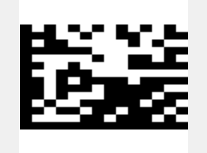
Good afteroon Tünde,
this TMSFNCWXBarcode1.GetBarcode('979323060' + #13 + '20' + #13);
is what i do .... and i got, as result, the datamatrix i sended.
But i have the bad result when i read the code.
I think that is a bad reader configuration and is not so easy to get the rigth configuration.
I use Zebra reader model DS2208, if you have the same model can you share the correct ADF to read in order to fox it?
If you have another reader, can tell me the brand and the model ?
It's certainly not on the reader, the 2 produced barcodes are different. Scanning yours gets a different result from ours.
Did you select the bciDataMatrix BarcodeType? Do you have any other non-default settings applied to the component?
Please see attached project that we used for testing. It also contains the output datamatrix.
Do you get a different result if you run this? barcode.zip (7.2 KB)
Good afternoon Tünde,
no way ....
I runned the project and .... i got the same result.
I think that the problem is inside the reader.
Even Zebra support is in trouble.
I'm ready to do some test with the your reader; Can you give me brand name and model ?
Thank you so much for your help.
Best regard
Daniele
PS: I'm out of office till 15/10/2026, so i'll can answer after that date .... sorry
We used an android scanner app and a website too to test with, we do not have a physical reader. The android application actually was able to read your inital datamatrix but it had 2 linebreaks between the lines.
Based on this, it might indeed be something in your scanner related to linebreaks. Perhaps there's a setting somewhere that needs to be enabled or it expects the linebreak in a certain format?
Please see your private messages, I sent you an incremental source update that handles #13 and #10 correctly (\r and \n respectively for encoding).