Authentification JWT

Bonjour,

J'ai fais un serveur XData basé sur la démo XData_ToDoListServer et une application TMS WEB comme dans la démo. Mon serveur se connecte à une base de donnée MSSQL avec un composant FireDac et un TAureliusConnection. Quand je clic sur le bouton login L'appel au service d'authentification se déroule bien et un Token est renvoyé. Quand je charge les données de ma table, le token est bien envoyé dans le Header 'Authorization', 'Bearer ', mais coté serveur dans l'évènement XDataServerGenericRequest Context.Request.User est toujours égale à nil.

En débug, dans le code TMS on voit que la propriété User est bien créer, mais elle repasse à nil ensuite !

Quand je compile la démo cela fonction.

Je n'arrive pas à comprendre où est le problème, pouvez-vous m'aider ?

Hello, please write in English, this is a public forum that all users can benefit from, so English is the preferred language for the discussion.

I understand you have a project based on XData_ToDoListServer that doesn't work, while XData_ToDoListServer does. First thing is let us know the differences between both projects.

I also understand that you said Request.User is set, but then you see the property is reverted to nil. How do you "see" it, exactly?

Voici la traduction en anglais de votre texte. Il est formaté de manière à pouvoir être copié-collé directement sur un forum anglophone (comme le support de TMS) :

Here is my problem:

After a successful WEB client authentication, and once the client has stored the token returned by the server in the "localStorage", when the second call to load the table is sent to the server—making sure to add the value "Authorization = Bearer XXXXx" to the header—the server responds with a 401 "Unauthorized" message.

The code to add the token to the request is as follows:

Delphi

/*
procedure TwfMain.XDataWebConnection1Request(Args: TXDataWebConnectionRequest);
begin
  if GetToken <> '' then
    Args.Request.Headers.SetValue('Authorization', 'Bearer ' + GetToken);
end;
*/

The GetToken function correctly returns the token sent by the server.

Every call to the server goes through the following code:

Delphi

/*
procedure TServerContainer.XDataServerGenericRequest(Sender: TObject;
  Context: THttpServerContext; Next: THttpServerProc);
var
  LastSegment: string;
begin
  LastSegment := '';
  if (Length(Context.Request.Uri.Segments) > 0) then
    LastSegment := Context.Request.Uri.Segments[Length(Context.Request.Uri.Segments) - 1];
  LastSegment := LowerCase(LastSegment);

  // Unless user is trying to login or create user, forbid any access to the API without a token
  if (Context.Request.User = nil) and (LastSegment <> 'login') and (LastSegment <> '$model') then
  begin
    Context.Response.StatusCode := 401;
    Context.Response.ContentType := 'text/plain';
    Context.Response.Close(TEncoding.UTF8.GetBytes('Unauthorized'));
  end
  else
    Next(Context);
end;
*/

On the second call, the Context.Request.User property should contain the user credentials added to the token with the following function:

Delphi

/*
function TAGILadService.Login(const UserName, Password: string): string;
var
  JWT: TJWT;
  Abonne: TAbonne;
begin
  // Check if UserName and Password are valid
  Abonne := TXDataOperationContext.Current.GetManager.Find<TAbonne>
    .Where((Linq['Login'] = UserName) and (Linq['Mdp'] = Password))
    .UniqueResult;
  if Abonne = nil then
    raise EXDataHttpException.Create(400, 'Invalid user name or password.');

  // Now that application specific logic is finished, generate the token
  JWT := TJWT.Create(TJWTClaims);
  try
    JWT.Claims.Issuer := 'Agisoft LAD Server';
    JWT.Claims.SetClaimOfType<Integer>('userId', Abonne.Id);
    JWT.Claims.Expiration := Now + 1; // 1 day expiration
    Result := TJOSE.SHA256CompactToken(JWTSecret, JWT);
  finally
    JWT.Free;
  end;
end;
*/

However, it is always nil, which results in my 401 response code.

On the WEB client side, the response to the login in the console is as follows:

JSON

{
    "value": "eyJ0eXAiOiJKV1QiLCJhbGciOiJIUzI1NiJ9.eyJpc3MiOiJBZ2lzb2Z0IExBRCBTZXJ2ZXIiLCJ1c2VySWQiOjU5MywiZXhwIjoxNzg2MDI2OTkxfQ.G1IXOUZ2Kc2SoCUbE7BVGMqRmyPRaLqusXTEevUKWIg"
}

Loading the table with the following URL:

Request URL: http://localhost:2002/tms/xdata/AbonneCriee

Request Method: GET

Request Headers:

HTTP

GET /tms/xdata/AbonneCriee HTTP/1.1
Accept: */*
Accept-Encoding: gzip, deflate, br, zstd
Accept-Language: fr-FR,fr;q=0.9,en-US;q=0.8,en;q=0.7,la;q=0.6
Connection: keep-alive
Host: localhost:2002
Origin: http://127.0.0.1:8000
Referer: http://127.0.0.1:8000/
Sec-Fetch-Dest: empty
Sec-Fetch-Mode: cors
Sec-Fetch-Site: cross-site
User-Agent: Mozilla/5.0 (Linux; Android 15; Pixel 9) AppleWebKit/537.36 (KHTML, like Gecko) Chrome/150.0.0.0 Mobile Safari/537.36
authorization: Bearer eyJ0eXAiOiJKV1QiLCJhbGciOiJIUzI1NiJ9.eyJpc3MiOiJBZ2lzb2Z0IExBRCBTZXJ2ZXIiLCJ1c2VySWQiOjU5MywiZXhwIjoxNzg2MDMwOTk4fQ._1Dc7H_8wYq0gTuQtLVGRt-QxjY_ZTR7Kgy3-2nI43c
sec-ch-ua: "Not;A=Brand";v="8", "Chromium";v="150", "Google Chrome";v="150"
sec-ch-ua-mobile: ?1
sec-ch-ua-platform: "Android"
Hello,

The differences between my code and the XData_ToDoListServer demo are:

  • The database (MSSQL) consists of 3 tables. Below are the corresponding Aurelius entities:

Extrait de code

unit AGIGestComEntities_u;

interface

uses
  Aurelius.Mapping.Attributes,
  Aurelius.Types.Proxy;

type
  [Entity, Automapping]
  [Table('CRIEES_V4')]
  TCriee = class
  strict private
    [column('CR_ID')]
    FId:Integer;
    [Column('CR_CODE')]
    FCode:String;
    [Column('CR_DESC')]
    FDesc:String;
    [Column('CR_ADDR_DATA_REF')]
    FAddrDataRef:String;
    [Column('CR_ADDR_CDV')]
    FAddrCdv:String;
  public
    property Id: Integer read FId write FId;
    property Code: String read FCode write FCode;
    property Desc: String read FDesc write FDesc;
    property AddrDataRef: String read FAddrDataRef write FAddrDataRef;
    property AddrCdv: String read FAddrCdv write FAddrDataRef;
  end;

  [Entity, Automapping]
  [Table('ABONNESCRIEES')]
  TAbonneCriee = class
  strict private
    [column('ACR_ID')]
    FId:Integer;
    [column('AB_ID')]
    FAbId:Integer;
    [column('ACR_US_ID')]
    FUsId:Integer;
    [column('ACR_LOGIN')]
    FLogin:String;
    [column('ACR_MDP')]
    FMdp:String;
    [column('ACR_CODE_ACHETEUR')]
    FCodeAcheteur:String;
    [column('CR_CODE')]
    FCodeCriee:String;
  public
    property Id: Integer read FId write FId;
    property AbId: Integer read FAbId write FAbId;
    property UsId: Integer read FUsId write FUsId;
    property Login: String read FLogin write FLogin;
    property Mdp: String read FMdp write FMdp;
    property CodeAcheteur: String read FCodeAcheteur write FCodeAcheteur;
    property CodeCcriee: String read FCodeCriee write FCodeCriee;
  end;


  [Entity, Automapping]
  [Table('ABONNES')]
  TAbonne = class
  strict private
    [Column('AB_ID')]
    FId:Integer;
    [Column('AB_ACTIF')]
    FActif:Boolean;
    [Column('AB_VALIDE')]
    FValide:Boolean;
    [Column('AB_ETAT')]
    FEtat:Integer;
    [Column('AB_LOGIN')]
    FLogin:String;
    [Column('AB_MDP')]
    FMdp:String;
  public
    property Id: Integer read FId write FId;
    property Actif: Boolean read FActif write FActif;
    property Valide:Boolean read FValide write FValide;
    property Etat:Integer read FEtat write FEtat;
    property Login:String read FLogin write FLogin;
    property Mdp:String read FMdp write FMdp;
  end;

implementation


initialization

  RegisterEntity(TCriee);
  RegisterEntity(TAbonne);
  RegisterEntity(TAbonneCriee);

end.

  • Database access is handled using a TFDConnection component.

Thank you for your help.

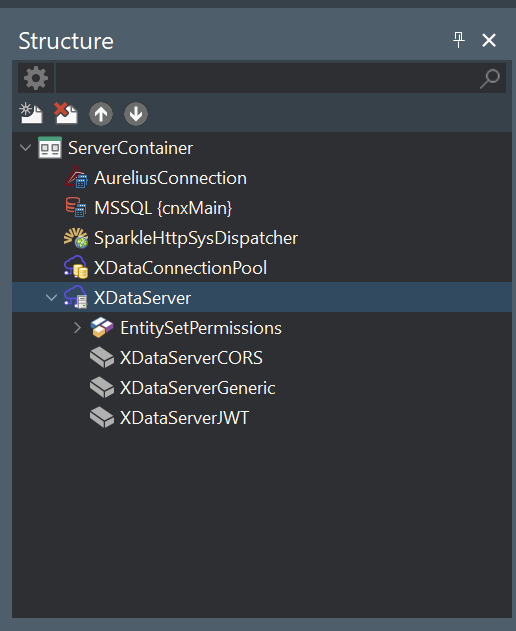
If Request.User is nil, either the authorization header is to being sent by the client in the request, or you didn't add the JWT middleware to the XData server.

Hello,

I confirm that the authorization header is indeed being sent by the client. Here is the request:

HTTP

GET /tms/xdata/AbonneCriee HTTP/1.1
Accept: */*
Accept-Encoding: gzip, deflate, br, zstd
Accept-Language: fr-FR,fr;q=0.9,en-US;q=0.8,en;q=0.7,la;q=0.6
Connection: keep-alive
Host: localhost:2002
Origin: http://127.0.0.1:8000
Referer: http://127.0.0.1:8000/
Sec-Fetch-Dest: empty
Sec-Fetch-Mode: cors
Sec-Fetch-Site: cross-site
User-Agent: Mozilla/5.0 (Linux; Android 15; Pixel 9) AppleWebKit/537.36 (KHTML, like Gecko) Chrome/150.0.0.0 Mobile Safari/537.36
authorization: Bearer eyJ0eXAiOiJKV1QiLCJhbGciOiJIUzI1NiJ9.eyJpc3MiOiJBZ2lzb2Z0IExBRCBTZXJ2ZXIiLCJ1c2VySWQiOjU5MywiZXhwIjoxNzg2MDMwOTk4fQ._1Dc7H_8wYq0gTuQtLVGRt-QxjY_ZTR7Kgy3-2nI43c
sec-ch-ua: "Not;A=Brand";v="8", "Chromium";v="150", "Google Chrome";v="150"
sec-ch-ua-mobile: ?1
sec-ch-ua-platform: "Android"
I also confirm that the JWT middleware has been correctly added to the XData server.

Please find attached a zip file containing both the Client and Server projects.

Thank you for your help.

Projet TMS.zip (94.8 KB)

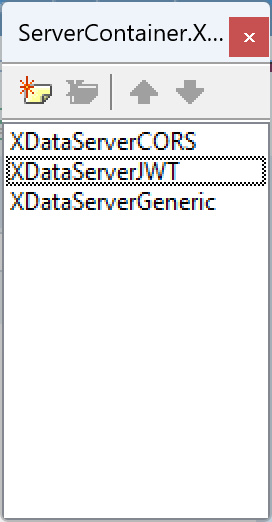
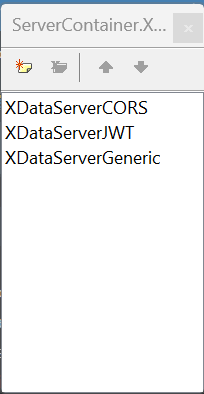
You must ensure that the JWT middleware comes before the Generic middleware, since in the latter you are already checking for the existence of the Request.User property. If it comes before the JWT, then the User is never set (as it is set in the JWT middleware).

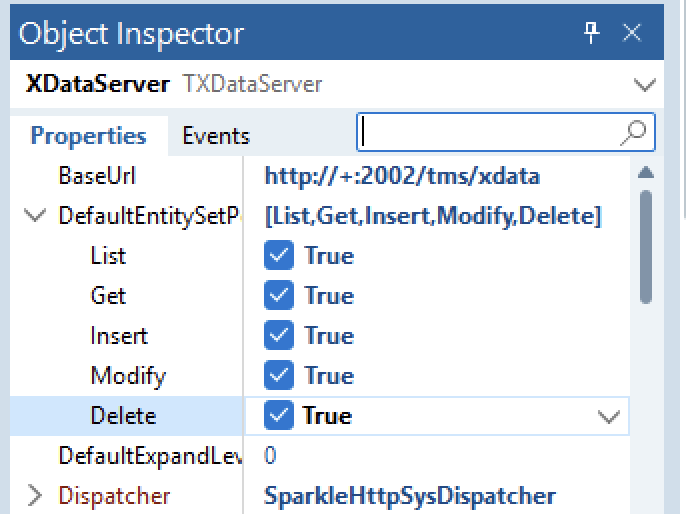
Also, since you are using entity sets, make sure you enable the default entity set permissions, otherwise you will get a 403 error as well.

Hello,

Thank you for your help. I wasn't aware that the order of the middlewares in the Object Inspector is what is taken into account, rather than the order displayed in the Structure pane.

Thank you