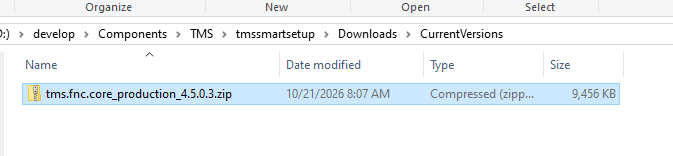
Installation failed as follows when using both the TMS Dashboard and/or the tmsSmartSetup.
I am updating Sydney 10.4 with FNC core and maps
[17:14:15] === Repository Summary ===
[17:14:15] Found tms.smartsetup.windows in repository
[17:14:15] - tms.fnc.core -> SKIPPED (Up to date)
[17:14:15] - tms.fnc.maps -> SKIPPED (Up to date)
[17:14:15] Download tasks finished
[17:14:15] Total: 0, Processed: 0
[17:14:15] Starting build...
[17:14:15] Found tms.fnc.maps in repository
[17:14:15] Found tms.fnc.core in repository
[17:14:15]
[17:14:15]
[17:14:15] === Fetch Summary ===
[17:14:15] Configuration file: C:\Users\zag222\Downloads\tmssmartsetup\tms.config.yaml
[17:14:15] Error: The project id "tms.fnc.core" is repeated in files "C:\Users\zag222\Downloads\tmssmartsetup\Products\tms.fnc.core\tmsbuild.yaml" and "C:\Users\zag222\Downloads\tmssmartsetup\Downloads\CurrentVersions\tmsbuild.yaml". Make sure only one is available.
[17:14:15] Cleaning up downloaded files...
[17:14:15] Finished cleaning up downloaded files.
[17:14:15] Can't process downloaded file "C:\Users\zag222\Downloads\tmssmartsetup\Downloads\CurrentVersions\tmsbuild.yaml", looks invalid. You might need to delete it manually. Only .tar.zst and .zip extensions are allowed.
[17:14:15] Can't process downloaded file "C:\Users\zag222\Downloads\tmssmartsetup\Downloads\CurrentVersions\version.txt", looks invalid. You might need to delete it manually. Only .tar.zst and .zip extensions are allowed.
There were errors. For troubleshooting, check Troubleshooting Guide for Installing Components Using Smart Setup | TMS Smart Setup documentation . Logs generated at "C:\Users\zag222\Downloads\tmssmartsetup\Logs\logs.zip".
You should not have any product file in that folder (Downloads\CurrentVersions), that place should only have compressed .zip (or .zstd) files. Somehow you or something else uncompressed (or copied) files there in that folder.
Delete any file there that is not .zip or .zstd and try again.
The error is different from before. This is what the log mentions:
Error: There is another version of "TMS FNC Core" installed with setup.exe. Please uninstall it from Start Menu->Add or remove programs.
So, you must follow the instructions and uninstall TMS FNC Core manually from Windows Start Menu -> Add or remove programs or Control Panel. It was installed with previous old deprecated installer and it is to compatible with Smart Setup.
I did not think of that. The deprecated installer would uninstall the older version and install the new version. Core and maps have been seamlessly installed now. Thanks for your help!