Hello,
Delphi 13.1 Florence, VCL, Win64, TMS FNC Gantt Chart 1.3.3.13, TMS FNC Core 4.5.0.3.
While working with the task list we ran into an access violation that we traced back to its selection, and noticed three more things along the way. All four are in the attached demo GanttSelectionDelete.zip. It runs by itself after start and writes a log next to the exe. Apart from test 1b, where TMS itself raises the exception, the demo never dereferences a pointer that may be stale; it only compares pointer values with the current node structure and task tree.
A note first, so that you can judge the first point correctly. In our application we switch on multi-selection of the task list (Interaction.MultiSelect with msSiblingOnly). TaskList is protected, so we reach it through an access class (a descendant of TTMSFNCGanttChart). We also take over OnAfterSelectNode of the list, because the chart's own handler (DoOnNodeSelect) reduces every selection to one task. We know that the chart is built around one selected task. The demo therefore uses the default settings everywhere (single selection, public methods only), except test 1c, which shows our setup. Points 2 to 4 do not depend on the selection at all.
1. Deleting the selected task: access violation in EndUpdate, and the task list keeps the old node in its selection
Demo, test 1b, default settings: nine tasks (R1, R2, P with P.1–P.4, R3, R4), SelectTask(R2), then
GanttChart.BeginUpdate;
GanttChart.DeleteTask(R2);
GanttChart.EndUpdate;   // EAccessViolation
EndUpdate raises EAccessViolation ("read of address FFFFFFFFFFFFFFFF"). Call stack (screenshot Test1b_v2_callstack_AV.png):
TObject.InheritsFrom + $8
@IsClass + $11
TTMSFNCCustomGanttChart.GetSelectedRow + $78
TTMSFNCCustomGanttChart.UpdateTimeLineViewDates
TTMSFNCCustomGanttChart.UpdateGanttTimelineSettings
TTMSFNCCustomGanttChart.UpdateGanttTimeline + $47
TTMSFNCCustomGanttChart.EndUpdate + $90
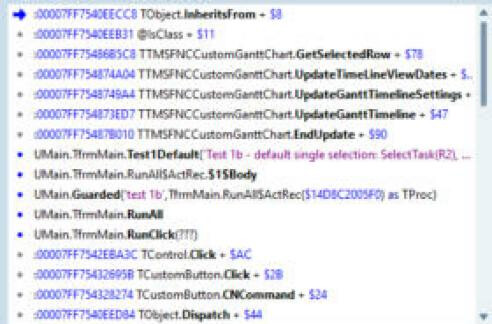
Nothing takes the deleted task out of the timeline selection before the chart looks at it again. TTMSFNCCustomGanttChart.ProjectTaskDelete (VCL.TMSFNCGanttChart.pas, line 8336) only calls the adapter and fires OnGanttTaskDelete, and inside BeginUpdate it skips even that (see point 3). The selected timeline item therefore still has the freed task as its DataObject. EndUpdate → UpdateGanttTimeline (line 8556) → UpdateGanttTimelineSettings → UpdateTimeLineViewDates (line 8779) → GetSelectedRow then runs DataObject is TTMSFNCGanttTask (line 6075) on freed memory. GetSelectedTask (line 6091, called from UpdateGanttTimelineItems, line 8705) has the same check. Reading the code, a delete without BeginUpdate takes the same route right away (ProjectTaskDeleted → UpdateGanttChartItems → UpdateGanttTimelineItems → SelectedTask); see test 1d below.
After the exception, the list selection still holds the freed node of R2. In all our runs, its address had already been reused for the node of R3, so R3 was shown as selected, and the focused node was nil. The timeline stayed empty for the rest of the run; we did not look into why. Test 1a is the control: the same steps without DeleteTask. There the selection is restored correctly in the list and in the timeline.
Test 1d repeats 1b without BeginUpdate, on a second chart with default settings (after the exception in 1b the timeline of the first chart stays empty). In two runs there was no exception. The list selection, however, again holds the old pointer, which now belongs to the node of R3, and the focused node is nil, the same as after 1b. So the list part does not depend on BeginUpdate. That no exception was raised does not show that no freed memory was read: whether is fails depends on what the memory manager has put into the block.
The list part has its own cause. TTMSFNCCustomGanttChart.EndUpdate (line 10111) calls FTaskList.ClearNodes (so does UpdateGanttListItems when the structure has changed, line 8434, which is the path of test 1d), and TTMSFNCGanttListData.ClearNodes (VCL.TMSFNCGanttListData.pas, line 2885) resets the focused node, but not the selection:
procedure TTMSFNCGanttListData.ClearNodes;
begin
  BeginUpdate;
  NodeListBuild := False;
  Nodes.Clear;
  ClearFocusedNode(nil);
  EndUpdate;
end;
TTMSFNCCustomGanttList.ClearFocusedNode (VCL.TMSFNCCustomGanttList.pas, line 3068) only sets FFocusedNode := nil. The rebuild then runs BuildNodeList, and FNodeStructure.Clear (VCL.TMSFNCGanttListData.pas, line 3532) frees every virtual node, because TTMSFNCGanttListNodeStructure is a TObjectList<TTMSFNCGanttListVirtualNode>. FSelectedNodes still points to these nodes. The selection is restored only through the timeline (UpdateGanttTimelineItems → SelectTask(selTask) → SelectVirtualNode, which clears FSelectedNodes first). When the timeline has no valid selected task, nothing touches the list selection. The path that removes a single node already does both: RemoveNodeInternal (VCL.TMSFNCGanttListData.pas, lines 4442 and 4457–4459) calls ClearFocusedNode(ANode) and RemoveNodeFromSelection(ANode). Only the clear-all paths ClearNodes and ClearNodeList (line 2877) are missing the second half.
TMS reads the stale list entries itself as well:
DoOnTaskListBeforeDrawNodeText(VCL.TMSFNCGanttChart.pas, line 5368) comparesFTaskList.SelectedNodes[I] = ANode.Nodefor every cell it draws, andGetSelNode(VCL.TMSFNCCustomGanttList.pas, line 3337) returns.Nodeof the freed virtual node.HandleKeyDownreadsRowof the first and the last entry ofFSelectedNodesfor Shift+arrow (line 7731 ff.).
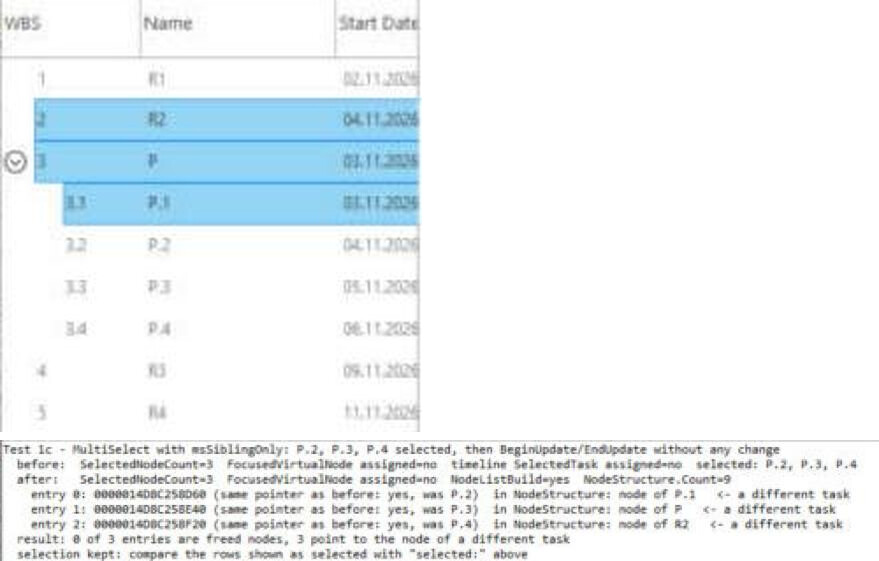
With our multi-selection the list part shows up without any delete. Test 1c selects the siblings P.2, P.3 and P.4 with SelectVirtualNodes and then calls BeginUpdate/EndUpdate without any change. Afterwards the three entries point to the nodes of P.1, P and R2. The list shows these three rows as selected, on two levels (screenshot Test1c_v2_siblings_selection_after_EndUpdate.png), and a delete command working on SelectedNodes would delete the wrong tasks. In our application the memory had once been reused for something else, and our code got an access violation (also "read of address FFFFFFFFFFFFFFFF") the next time it looked at the DataObject of SelectedNodes[0].
Suggestions:
- When a task is deleted, remove its timeline item from the timeline selection right away, also inside
BeginUpdate. Alternatively, check that the selected task still belongs to the project beforeGetSelectedRow/GetSelectedTasklook at it. - Clear the list selection together with the focus, for example:
procedure TTMSFNCCustomGanttList.ClearFocusedNode(ANode: TTMSFNCGanttListVirtualNode);
begin
  if (ANode = FFocusedNode) or (ANode = nil) then
    FFocusedNode := nil;
  if ANode = nil then
    FSelectedNodes.Clear;
end;
ClearFocusedNode(nil) is called only from ClearNodes and ClearNodeList (lines 2881 and 2890), so this would not change the single-node path. Even better: remember the DataObject of the selected nodes and of the focused node before the rebuild, and select them again afterwards, as the timeline path already does for one task.
Until then, we clear the selection (SelectTask(nil)) before we delete tasks, and we drop the whole list selection after each outer EndUpdate when no valid focused node is left.
2. DeleteTask leaves the link of the successor pointing to the deleted task
TTMSFNCGanttTask.Destroy (VCL.TMSFNCGanttClasses.pas, line 2844) clears its own TaskDependencies (line 2856), that is, its links to its predecessors. Links of other tasks that point to the destroyed task stay. TTMSFNCGanttProject.RemoveDependentTask (line 5038) would remove them, but nothing calls it: TTMSFNCGanttProject.DeleteTask (line 4438) only deletes the collection item.
Demo, test 4: A, and B with a finish-to-start link on A. Inside BeginUpdate/EndUpdate: DeleteTask(A), then a new, unrelated task N, four weeks later:
before:  A=0000020ED1D3B980  B.TaskDependencies.Count=1  DependsOnTask=0000020ED1D3B980  B starts Thu 2026-11-05
after DeleteTask(A):  B.TaskDependencies.Count=1  DependsOnTask=0000020ED1D3B980  same as the deleted A: yes
new task N=0000020ED1D3B980  N got the address of the deleted A: yes
After CalculateTasks: B starts Wed 2026-12-02 (before: Thu 2026-11-05), N ends Wed 2026-12-02
So B keeps a link to freed memory. As soon as the memory manager hands that block to a new task, B silently follows a task that nobody linked to it, and the timeline draws a link line from N to B (screenshot Test4_link_N_to_B.png). Reading the code, the same happens to links on subtasks when a parent task is deleted. We also saw it in our application when Assign rebuilds the subtasks of a parent task. We now remove these links ourselves before every delete. Would it make sense for Destroy (or DeleteTask) to remove them, for example via RemoveDependentTask?

3. OnGanttTaskDelete is not fired inside BeginUpdate/EndUpdate, by ClearTasks, or for subtasks
The documentation says "Occurs before a task is deleted from the project." Demo, test 2:
2a  DeleteTask(X), no BeginUpdate:                         fired 1 time(s)  [X]
2b  DeleteTask(X) inside BeginUpdate/EndUpdate:            fired 0 time(s)  []
2c  Project.ClearTasks with X and Y:                       fired 0 time(s)  []
2d  DeleteTask(P) with subtasks P.1, P.2, no BeginUpdate:  fired 1 time(s)  [P]
The event is blocked in two places:
TTMSFNCGanttProject.DoInternalTaskDelete(VCL.TMSFNCGanttClasses.pas, line 4584) only notifies whenFUpdatingis False.TTMSFNCCustomGanttChart.ProjectTaskDelete(VCL.TMSFNCGanttChart.pas, line 8338) only fires the event whenFUpdateCount = 0.
BeginUpdate of the chart sets both (line 3421 calls Project.BeginUpdate). TTMSFNCGanttTasks.Clear (VCL.TMSFNCGanttClasses.pas, line 3593) sets FUpdating by itself. TTMSFNCGanttTask.Destroy uses it for the subtasks (FSubTasks.Clear, line 2855), so subtasks are never reported, even without BeginUpdate.
An application that keeps its own data per task (for example in DataPointer) therefore cannot rely on the event to release it. Most deletes happen inside BeginUpdate/EndUpdate, so the event does not come for them. Is this intended? If so, could the documentation say so? Otherwise, could the event be fired for every deleted task, including subtasks? Reading the code, the call FAdapter.DeleteTask(ATask) sits in the same branch of ProjectTaskDelete. We do not use an adapter, so we have not checked whether it catches up later.
4. PageDown/PageUp in the task list moves too little when a parent task is collapsed
TTMSFNCCustomGanttList.HandleKeyDown computes the new row as sel.Row + (StopRow - StartRow) for PageDown (line 7672) and sel.Row - (StopRow - StartRow) for PageUp (line 7655). The two values do not count the same thing:
Rowis the index inNodeStructure, which includes the subtasks of collapsed parents.StartRow/StopRowcount visible rows (TTMSFNCGanttListBase.UpdateVisualRange, line 1188 ff., andGetVisibleNodeForIndex).
If the computed index lands on a hidden subtask, GetNextFocusableNode takes the next visible node. With a collapsed parent above, PageDown therefore jumps much less than a page. Reading the code, Shift+PageDown goes through the same calculation.
Demo, test 3 (default settings): a parent task P with 40 subtasks, followed by 40 tasks R01–R40, SelectTask(P), PageDown:
P collapsed:  page = 10 rows, visible rows=41
  focus on visible row 0 (P, Row=0), PageDown -> visible row 1 (R01, Row=41)   one page down would be visible row 10 (R10)
P expanded (for comparison):  page = 10 rows, visible rows=81
  focus on visible row 0 (P, Row=0), PageDown -> visible row 10 (P.10, Row=10)   one page down would be visible row 10 (P.10)
Suggestion: compute the target in visible rows, for example the index of sel in VisibleNodes plus or minus the page size (limited to the list), and then the next selectable node from there.
Thanks!
GanttSelectionDelete.zip (10.0 KB)