Hello TMS Support Team,
We are seeing a painting problem with TCurvyCombo (TMS VCL UI Pack, CurvyControls). We can reproduce it in a small standalone sample, attached.
Environment
TMS VCL UI Pack:component Version = '1.2.4.2' in the DFM
IDE and compiler: RAD Studio 13 (C++Builder)
OS: Windows 11 Enterprise
Problem
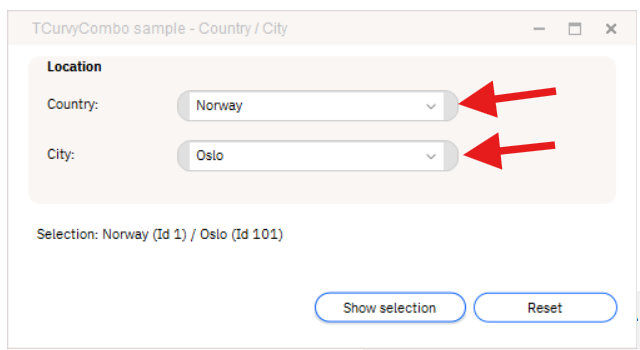
When the mouse moves over a TCurvyCombo, the control is painted with a grey background and its rounded corners and edges look wrong. The combo should keep a white background, a 1px rounded border and a different border color on hover. The screenshot is attached, with arrows on the affected combos.
Settings applied to each combo (see WB_Theme.cpp, ApplyToComponent)
p->StyleElements = TStyleElements() << seFont;
p->Color         = COLOR_WHITE;          // RGB(255,255,255)
p->BorderWidth   = 1;
p->BorderColor   = COLOR_GREY;           // RGB(204,204,204)
p->Rounding      = 10;
p->Height        = 24;
p->ShadowColor   = clNone;
p->Font->Name    = "IBM Plex Sans";
p->Font->Size = 8;
Style = csDropDownList.
Steps to reproduce
-
Open CurvyComboSample.cbproj and build it for Win32. It needs the TMS UI Pack Extra package.
-
Run the app or click on Run.bat Two combos are shown, Country and City.
-
Move the mouse over either combo.
-
The grey background artifact appears.
Expected: the combo keeps its white background and rounded border, and only the border color changes.
Actual: the combo is painted with a grey background and corners.
CurvyComboSample_WinnerBizz.zip (109.9 KB)