I would like to report a problem I encountered after updating my libraries from the TMS Dashboard.
I use Delphi 13.2, but I also use Delphi 7 for some older projects. After updating the selected libraries, everything seemed to be working until I launched Delphi 7. When I launched Delphi 7, the application could no longer find a whole set of packages. I then checked my “Path” environment variable, which was correct. I spent a day trying to find the cause, and finally, after using “Process Explorer,” I discovered that the path variable associated with Delphi 7 did not match the “Path” environment variable; instead, it contained “C:\Sources\RAD\Addon\Tms\TMS Setup.tmssetup\build\bpl\Win32.” After doing some research, I found that the Windows registry entry HKEY_CURRENT_USER\Software\Borland\Delphi\7.0\Environment Variables contained this value. I renamed this key, and after that, everything worked again.
Conclusion: TMS Smart Setup modified this key, and I don’t know why. If you could shed some light on this, it would help me understand. Thank you
Hi,
This is an interesting issue. It shouldn't happen in a normal delphi 7 installation (and I just tried it here and it doesn't), but I believe I can get why it is happening. Let's start by the beginning. How this is supposed to work for newer delphi versions:
- In newer delphi versions, you have a key like:
Computer\HKEY_CURRENT_USER\Software\Embarcadero\37.0\Environment Variables\Path
This key has a value like:
$(PUBLIC)\Documents\Embarcadero\InterBase\redist\InterBase15\IDE_spoof;$(PATH)
The $(PATH) at the end is critical, because it means: Use the variables we have here, if not, use whatever is in the Windows path.
- Some installers of third party tools (I just now recall about old versions of boss, but there are others), modify this entry and replace it by the actual windows path at the time they install. So the entry becomes:
$(PUBLIC)\Documents\Embarcadero\InterBase\redist\InterBase15\IDE_spoof;c:\...whatever is in your path. The $(PATH) is removed, and it is replaced by the actual path. It keeps working, because it still has the path at the moment you installed that library. - Now you want to install a component with smartsetup. We don't normally modify that ide registry key, but add ourselves to the Windows Path instead. But, as the $PATH is gone from the entry, delphi won't see changes in the Windows path and fail finding our components.
- So, only in the case when your registry key is already broken and doesn't have a $(PATH) entry, we add ourselves to that entry. So yes, you would find a
C:\\Sources\\RAD\\Addon\\Tms\\TMS Setup.tmssetup\\build\\bpl\\Win32there, but that's because the path was already broken, and we "fixed" it so it would find us.
Now, this was for newer versions, so let's see how this works in delphi 7.
- delphi 7 doesn't have environment variables by default. The entry is empty, both in the registry:
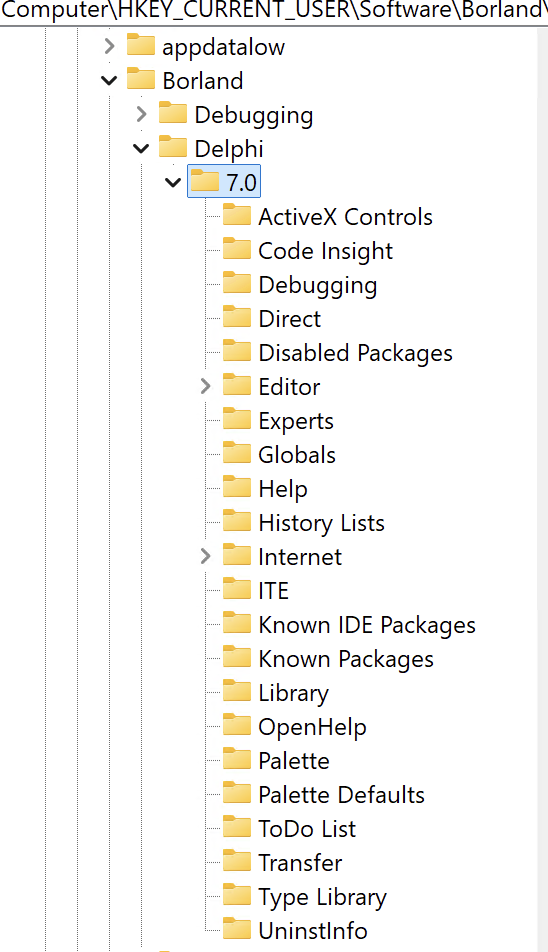
and in delphi itself:
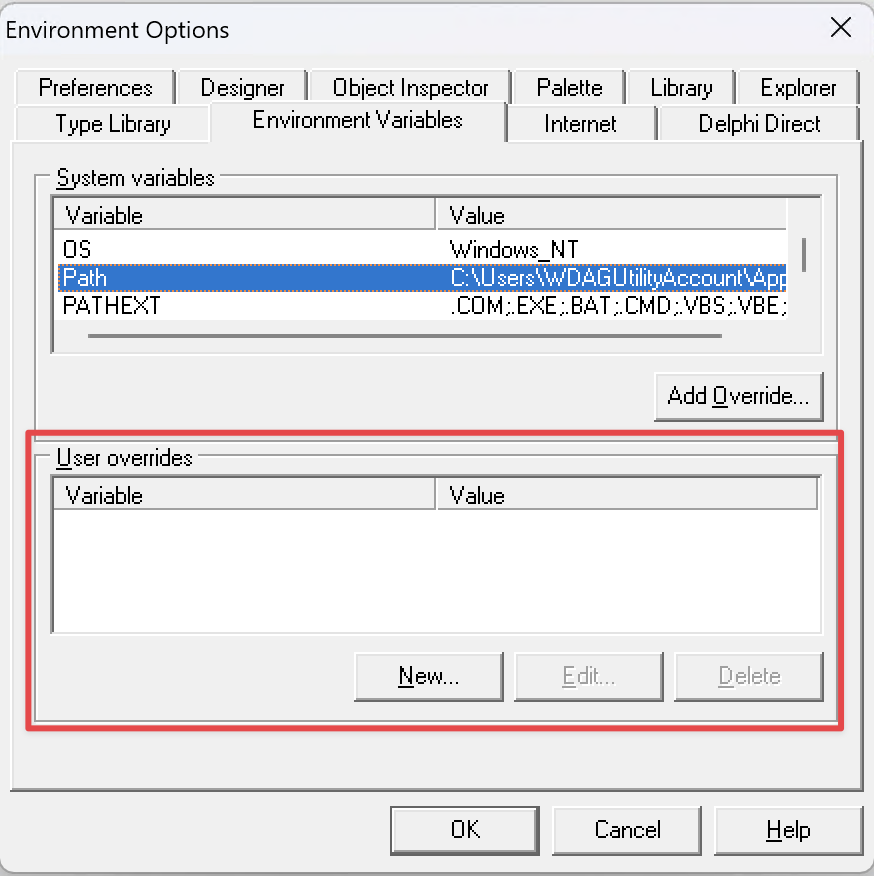
If that is the case (it is here in my machine), nothing will happen, because we never create a reg key if it doesn't already exist: smartsetup/common/src/Deget/Deget.DelphiInfo.pas at 984e9c1af08a2e9a0861d9ea6152f06edf1fb8cb · tmssoftware/smartsetup · GitHub Note how we only write the key if it already existed.
So, my guess is like this:
- For some reason you already had this key in Delphi 7. It should have existed but be empty, because if it had a value, you wouldn't have been able to compile anything unless it had a $(PATH) var
- Smartsetup looks at the empty existing entry, find out it lacks the $(PATH) part, so it adds itself there too, so delphi will be able to find it.
Could this be the case? Note that if you already had a non-empty PATH, we would just have added ourselves there, so it wouldn't have broken anything as the path already was overwritten. If you had no key at all (as it is the default), no key would have been written.
This could only break if you had an existing, but empty entry in the registry. If that was the case, indeed the value after using smartsetup would be C:\\Sources\\RAD\\Addon\\Tms\\TMS Setup.tmssetup\\build\\bpl\\Win32.. Not something;C:\Sources\RAD\Addon\Tms\TMS Setup.tmssetup\build\bpl\Win32.
What we can do on our side, is check if the entry is empty. Options will be:
- Key exists and includes $(PATH). We don't do anything. You will find our stuff because we are in the windows path. This is the most common case in modern delphi versions.
- Key exists, has a non empty value, but lacks $(PATH). We then add ourselves there, as it will be needed for delphi to find us. This is the case if you used a broken third party installer that removed the $(PATH) and replaced it by the actual path at the moment you run the installer.
- If key doesn't exist, we leave it as is.
Those 3 points are already like this today, but we would also add a 4th point: - If the key exists, but it is empty, we don't add ourselves there.
I believe this should fix your case, even if I am not sure the exact conditions in your environment.
Thank you for your explanation