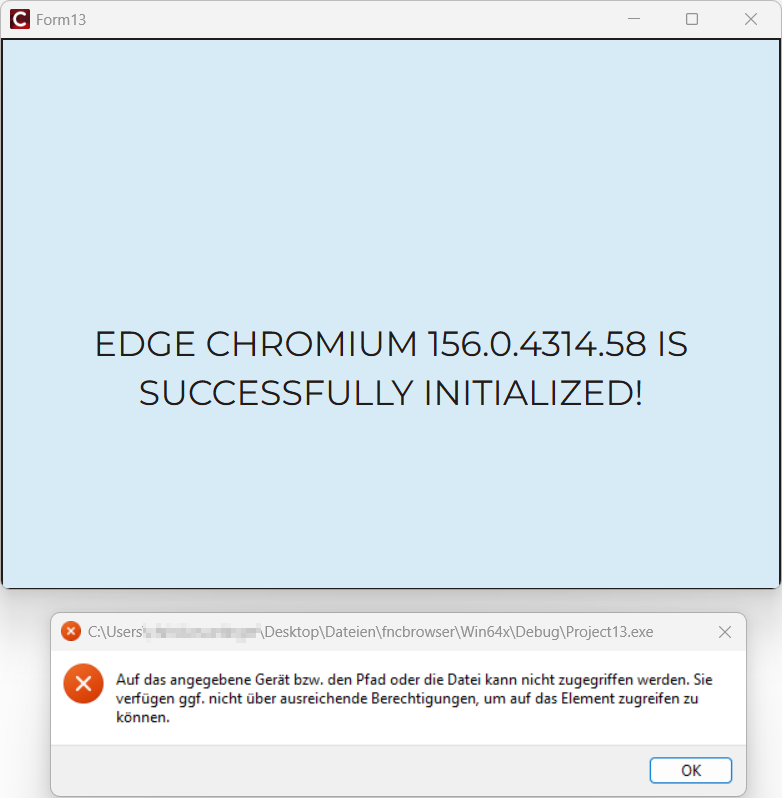
we have a big Problem with TTMSFNCEdgeWebBrowser and TTMSFNCGoogleMaps:
When two concurrent users are executing the same application the second startup crashes.
We have the following setup:
We have a DLL which is used within IIS
On each IIS we have multiple Instances (ApplicationPools)
We have multiple Webservers for each tenant
Because of our architecture we have shared libraries and the Browser-Component is linked when the library is used
The problem:
First AppPool starts, Initialization auf TMSFNCEdgeWebBrowser starts
Second AppPool starts, again Initialization starts
Second AppPool gets Access Denied on the Mutex (as it is another Identity)
Second AppPool crashes
As far as we found out the Problem is with CreateMutexW(nil, False, 'Local\TMSFNCWebBrowser.Cache.W3WP.1').
Steps to reproduce:
Create a new Project
Drop a TMSFNCEdgeWebBrowser or TTMSFNCGoolgeMaps on the Form
Compile
Start the application
Start a second Instance of the application but with "Shift -> Right click on the application -> Open as different user"
The second instance crashes with the following error
Thank you for the detailed analysis, it pointed us straight to the cause.
Cause
Since TMS FNC Core 4.4, the browser unit reserves a cache instance when it is loaded, so that two
instances of the same executable get separate WebView2 cache folders. It does this with a named mutex
in the session namespace, Local\TMSFNCWebBrowser.Cache.<EXE name>.<n>. When a process running under
another Windows identity already owns that mutex (two IIS application pools with different identities
both run w3wp.exe, or "Run as different user"), CreateMutex returns ERROR_ACCESS_DENIED for the
second identity. The code then raised an exception from the unit initialization, so the application or
DLL could not load. Version 4.3.1.2 did not have this reservation, which is why it still worked.
Fix
The fix will be in the next TMS FNC Core update, version 4.5.0.11:
A mutex that the current identity is not allowed to open is treated as "in use by another instance",
and the next instance number is used. The second identity then gets its own cache folder
(for example %TEMP%\w3wp_2\EdgeCache). The reservation never raises an exception any more.
An existing cache folder that the current identity cannot write to (for example when both identities
share C:\Windows\Temp) is no longer used; the browser falls back to a per-process cache folder.
A single application, or several instances under the same identity, behave exactly as before.
We reproduced the crash with a mutex the current user may not open (the second process stopped with
runtime error 217 at startup) and verified that with the fix the same process starts, takes the next
instance and initializes the Edge browser normally.
Workaround until 4.5.0.11 is available
Run the application pools that load this DLL under the same identity, or
Since TMS FNC Core ships with source, you can patch ReserveCacheInstance in VCL.TMSFNCWebBrowser.Win.pas (and/or FMX.TMSFNCWebBrowser.Win.pas, whichever framework your DLL
uses) and rebuild. Replace the body of the loop with:
  for instanceNumber := 1 to 1000 do
  begin
    mutexName := Format('Local\TMSFNCWebBrowser.Cache.%s.%d', [applicationName, instanceNumber]);

    SetLastError(ERROR_SUCCESS);
    h := CreateMutex(nil, False, PChar(mutexName));
    err := GetLastError;

    if h <> 0 then
    begin
      if err <> ERROR_ALREADY_EXISTS then
      begin
        GCacheInstanceMutex := h;
        GCacheInstanceNumber := instanceNumber;
        Exit;
      end;

      CloseHandle(h);
    end
    else if err <> ERROR_ACCESS_DENIED then
      Exit;
  end;
(declare err: DWORD; and remove the instanceNumber := 1; line and the while True do loop it
replaces). The 4.5.0.11 update contains this change, so you can drop the patch when you update.
If each application pool has its own user profile loaded ("Load User Profile" = True, the IIS default),
each identity also has its own %TEMP% folder and no further configuration is needed.