Hello,
I am experiencing
cblist.zip (12.8 KB)
an error when using a TTMSFNCCheckedListBox on a form.
The error happens when I try to create/display the form. This is the error:
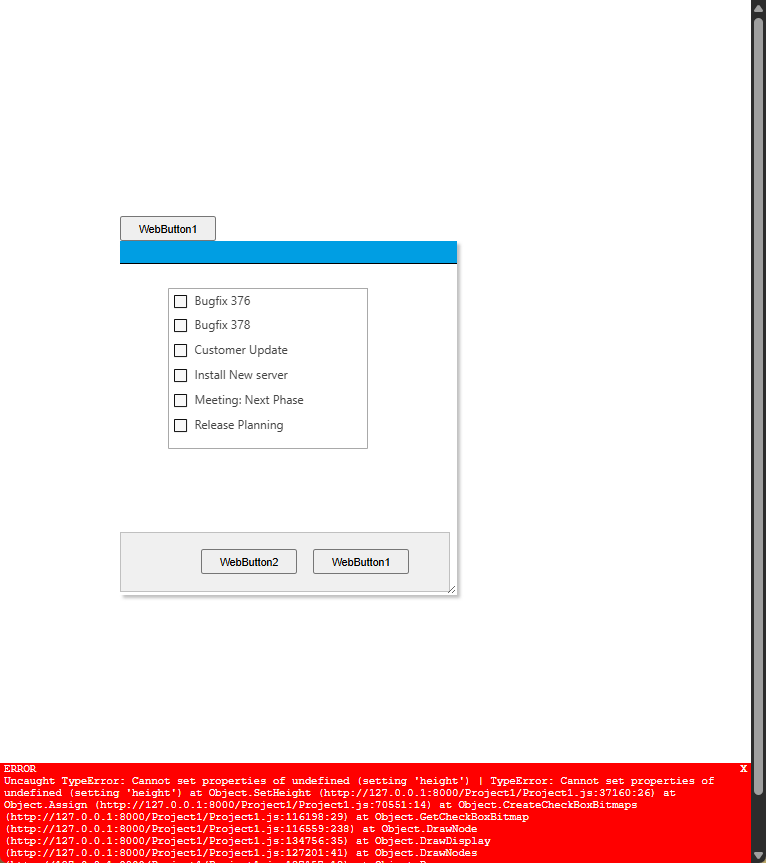
Uncaught TypeError: Cannot set properties of undefined (setting 'height')
    at Object.SetHeight (WEBLib.Graphics.pas:3130:1)
    at Object.Assign (WEBLib.TMSFNCTypes.pas:3031:5)
    at Object.CreateCheckBoxBitmaps (WEBLib.TMSFNCCustomControl.pas:3255:18)
    at Object.GetCheckBoxBitmap (WEBLib.TMSFNCCustomControl.pas:4218:5)
    at Object.DrawNode (WEBLib.TMSFNCTreeView.pas:916:55)
    at Object.DrawDisplay (WEBLib.TMSFNCCustomTreeView.pas:6868:9)
    at Object.DrawNodes (WEBLib.TMSFNCCustomTreeView.pas:6904:3)
    at Object.Draw (WEBLib.TMSFNCCustomTreeView.pas:7925:3)
    at Object.DrawControl (WEBLib.TMSFNCCustomControl.pas:2999:7)
    at Object.Paint (WEBLib.TMSFNCCustomControl.pas:3048:3)
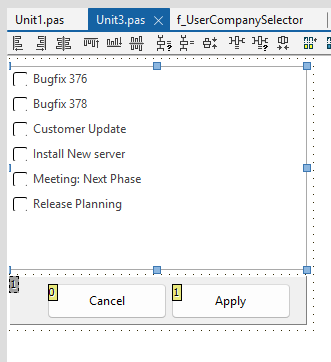
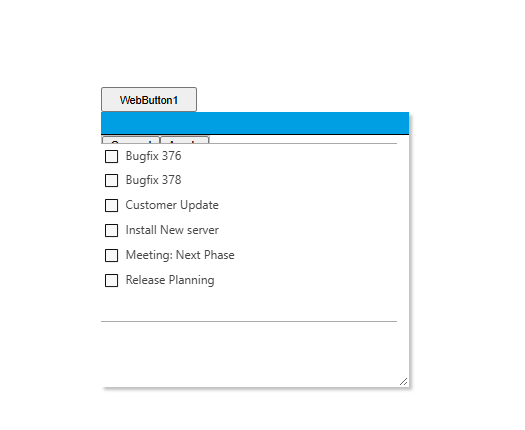
I also am seeing layout discrepancy issues between the form designer and the runtime results.
This is what I have on the form designer:
And this is what I see on the web browser:
Can you please look into why is this happening and how can i fix this right away?
I am using Delphi 13 Update 2 along with the latest TMS versions of all products.
I have attached a sample project for your convenience.
Thanks,
Alan
It has been about 5 days since I posted my request here. Is anyone from TMS looking into this?
The issue is that you set the bottom panel ElementPosition to epIgnore. This means it ignores the panel's Top / Left settings and thus, without any further HTML or CSS specification, it gets positioned at the form's top (0,0)
I changed the position to epAbsolute, and it made no difference in the outcome. Did I miss anything?
I did some further research and I am able to confidently say that just by dropping a TTMSFNCCheckedListBox on my form I cause issues with the UI and also it generates an error at runtime. Can you please use the attached sample project in this message to:
- compare the design-time UI to the resulting runt-time UI and verify that the results are incorrect;
- verify that an error is generated when showing the form - see below.
Project1.js:284 Uncaught TypeError: Cannot set properties of undefined (setting 'height')
    at Object.SetHeight (Project1.js:37159:26)
    at Object.Assign (Project1.js:70553:14)
    at Object.CreateCheckBoxBitmaps (Project1.js:116207:29)
    at Object.GetCheckBoxBitmap (Project1.js:116568:238)
    at Object.DrawNode (Project1.js:134765:35)
    at Object.DrawDisplay (Project1.js:127210:41)
    at Object.DrawNodes (Project1.js:127166:12)
    at Object.Draw (Project1.js:129556:12)
    at Object.DrawControl (Project1.js:116499:16)
    at Object.Paint (Project1.js:116720:12)
Thanks,
Alan
cblist.zip (12.7 KB)
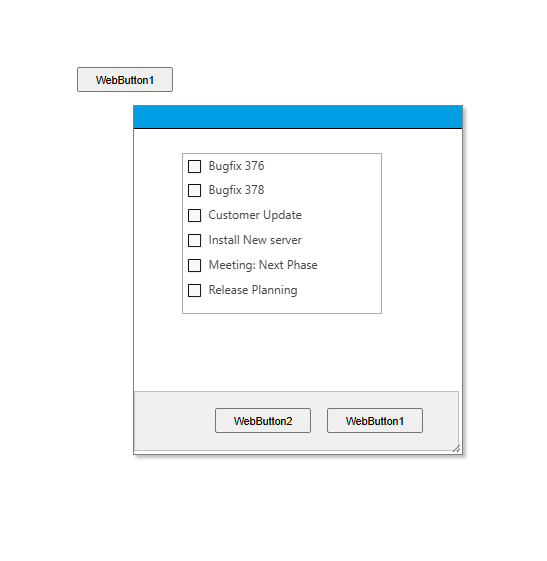
I redownloaded the test project, compiled it and ran it and I get:
I get no errors here.
Do you use the latest version of TMS WEB Core & TMS FNC UI Pack?
Yes. It is the latest everything on Delphi 13.2 Update 2 64 bit IDE.
These are the current versions of TMS products:
ms.biz.aurelius (5.31.0.0)
tms.biz.bcl (2.6.0.0)
tms.biz.remotedb (2.27.0.0)
tms.biz.scripter (8.1.0.0)
tms.biz.sparkle (3.41.0.0)
tms.biz.sphinx (2.6.0.0)
tms.biz.xdata (5.31.0.0)
tms.flexcel.vcl (7.27.2.0)
tms.fnc.blox (3.0.6.1)
tms.fnc.bloxtoolbars (1.0.1.0)
tms.fnc.chart (4.0.0.5)
tms.fnc.chartgridadapter (1.0.1.0)
tms.fnc.cloudpack (3.8.4.0)
tms.fnc.cloudpackresteditor (1.0.1.1)
tms.fnc.core (4.5.0.0)
tms.fnc.dashboardpack (1.3.2.4)
tms.fnc.excel.bridge (3.5.0.0)
tms.fnc.ganttchart (1.3.3.10)
tms.fnc.localization (0.9.3.0)
tms.fnc.maps (4.6.1.1)
tms.fnc.pushnotifications (1.0.2.3)
tms.fnc.uipack (7.3.1.2)
tms.fnc.websocket (1.0.6.2)
tms.fnc.wxpack (1.7.3.6)
tms.webcore (3.0.4.0)
Any ideas for me to figure this out?
Thanks,
Alan
PS - Checked for updates just now, updated and now my paths are broken again. I will fix and let you know if it made any difference.
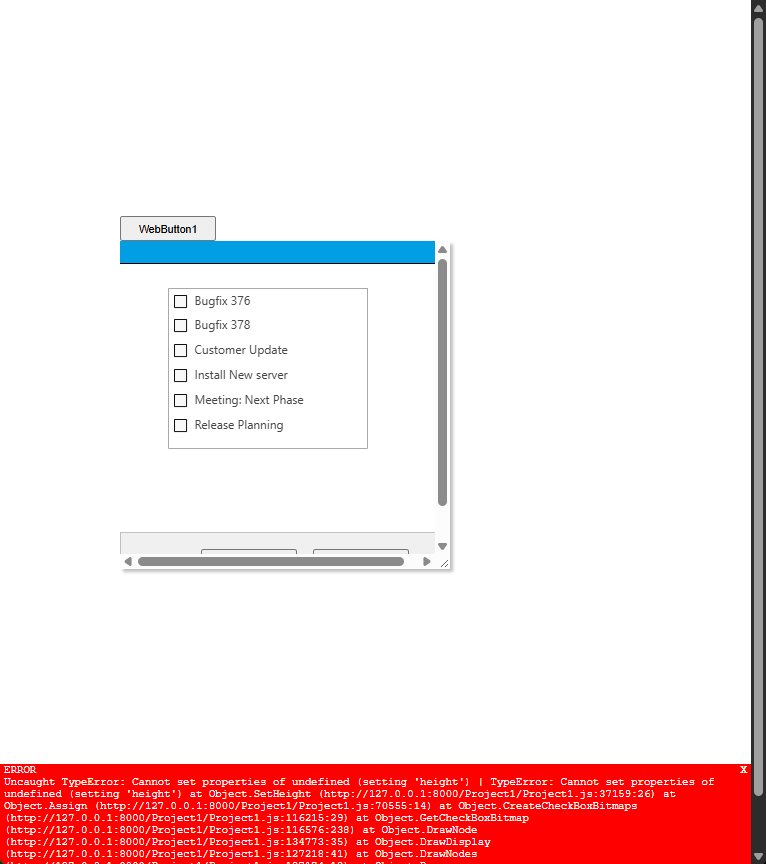
Even after updating TMS I am getting the same:
I am at a loss as per why this is happening here - I tried the 32-bit IDE and the 64-bit IDE and the results are the same.
What else can you suggest for me to look into?
Thanks,
Alan
What browser do you use? We tested here in Chrome.
Are you sure you sent the right project? When we run your project, the dialog is centered for example while on your screenshot it is not?
This is the test project we received here that we tested here:
Project1.zip (11.8 KB)
Downloaded the zip file attached to your comment, and this is what I get after compiling and running it:
I use Brave browser for testing. I also tested on Chrome and Firefox with the same results.
Still at a loss here.
Thanks,
Alan
Can you test from another machine with the latest TMS WEB Core release & latest TMS FNC UI Pack?
I do not have another machine where I am right now. I'll try on Monday when I do, and report back. In the meantime, have a great weekend.