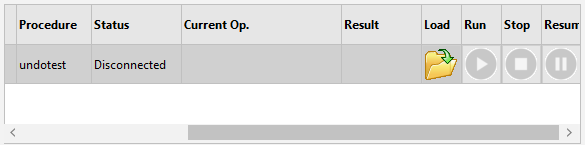
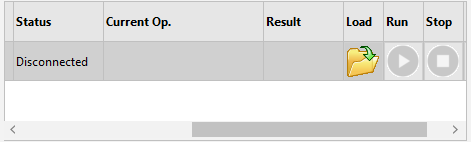
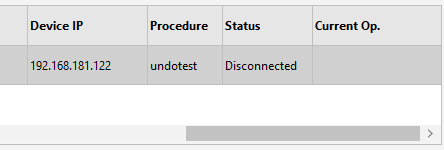
I have a FNCDataGrid with 10 columns. It is set to stretch mode index on column 2.
When the window is small enough to trigger a horizontal scrollbar i find some weird behavior. As long as column 2 is partially visible the scroll works as intended, however when the column moves off screen the entire grid shifts so the assigned stretch column reappears centered. This makes it impossible to scroll to the right side, leaving the final columns unreachable.
Thank you for the report and the screenshots. We tried to reproduce this with the current UI Pack (7.3.1.8
development version), but so far we could not. This is what we tested, in both VCL and FMX:
10 columns, Options.Column.Stretching enabled with Mode := gstmIndex, Range := gstrNormal, Index := 2
buttons added with AddButton and ControlAligns[...] := gcaClient in one column, and in other tests in the
stretch column, column 4 or the last column
a window narrow enough for a horizontal scroll bar, with and without a vertical scroll bar, with and without a
fixed column, after shrinking the window from a size where the stretch column was wide, and after clicking a
button in the grid
scrolling with the scroll bar arrows and by moving the scroll bar step by step from the left end to the right
end and back
In all cases the stretch column keeps its width once the columns no longer fit, the grid scrolls past it, and the
last columns are reachable.
How the stretching works: with gstmIndex, the stretch column gets the space that is left after the other columns.
When the other columns already need more space than the grid has, the stretch column gets the default column width
and the horizontal scroll bar appears. That calculation does not depend on the scroll position.
To find what is different in your application, could you tell us:
Is this VCL or FMX, and which UI Pack and Delphi version do you use?
Is the grid placed directly on the form, or inside a scroll box, panel or frame? Does the form (or that
container) show its own scroll bar?
Do you set column widths, DefaultColumnWidth, FixedColumnCount or auto-sizing in code, or change anything
in events such as OnAfterCalculate, OnGetCellLayout or a resize handler?
Which column holds the load buttons (COL_BTN_LOAD), and do you call StretchColumns or AutoSizeColumns
yourself?
A small project that shows the problem would be the quickest way. You can attach it here or send it to support@tmssoftware.com.